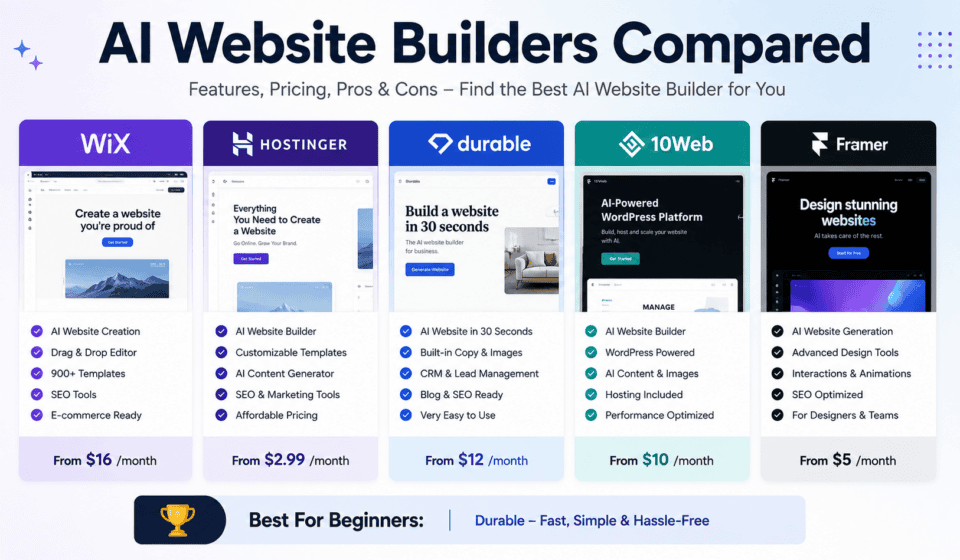

Building a website used to require a combination of design skills, coding knowledge, content writing, hosting, and plenty of time. Today, artificial intelligence has changed the process dramatically. AI website builders can generate layouts, write content, suggest images, create pages, and help users launch websites with little or no coding.
But with so many options available, choosing the right AI website builder can be difficult.
Should you use Wix, Hostinger, Squarespace, Framer, WordPress with an AI builder, or another platform? The answer depends on what you want to build, how much design control you need, your technical experience, and how much you expect your website to grow.
In this guide, we compare some of the most popular AI website builders and explain their strengths, weaknesses, ideal users, and important features.
What Is an AI Website Builder?
An AI website builder is a website creation platform that uses artificial intelligence to automate parts of the web design and development process.
Instead of starting with a blank page, you can describe what you want in natural language.
For example, you might enter:
“Create a modern website for a digital marketing consultant offering SEO, web design, and social media marketing services.”
The AI can then generate a website structure based on your description. Depending on the platform, it may create the homepage, navigation, service sections, calls to action, images, written content, color combinations, and other design elements.
AI website builders are particularly useful for beginners, freelancers, small businesses, marketers, and professionals who need to create websites quickly.
However, AI does not eliminate the need for human input. The best results usually come when you use AI to create the first version and then manually improve the content, branding, user experience, SEO, and conversion elements.
AI Website Builders Compared at a Glance
Here is a quick comparison of several popular options:
| AI Website Builder | Best For | Design Control | Ease of Use | WordPress |
|---|---|---|---|---|
| Wix | Small businesses and beginners | High | Very Easy | No |
| Hostinger | Affordable business websites | Medium-High | Very Easy | Yes, with WordPress option |
| Squarespace | Professional, design-focused websites | High | Easy | No |
| Framer | Designers, portfolios, startups | Very High | Easy-Medium | No |
| WordPress + AI | Flexible websites and content sites | Very High | Medium | Yes |
The “best” platform depends on your specific project rather than simply choosing the platform with the most AI features.
1. Wix AI Website Builder
Wix is one of the best-known website-building platforms, and its AI tools are designed to make the website creation process easier for beginners and businesses.
Wix’s AI website creation process allows users to provide information about their business and generate a personalized website. Its newer Wix Harmony Editor also uses an AI agent called Aria to help users create and customize sites.
Why Choose Wix?
The biggest advantage of Wix is its balance between automation and customization.
You can let AI create the initial website and then manually modify the pages. This makes Wix suitable for people who don’t want to code but still want control over their website.
Wix can be a strong choice for:
- Local businesses
- Freelancers
- Consultants
- Service providers
- Restaurants
- Portfolios
- Small online stores
- Personal websites
Another advantage is that you can continue developing your website after the AI has created the initial design.
Pros of Wix
- Beginner-friendly
- AI-assisted website creation
- Large ecosystem of website features
- Strong visual editing capabilities
- Suitable for many business types
- Good option for users who want an all-in-one platform
Cons of Wix
- Can become more expensive as your website grows
- Some advanced customization may require working within the Wix ecosystem
- AI-generated content still needs human editing
- Not the best choice for developers who want complete technical control
Best For
Best for beginners and small businesses that want an easy all-in-one website builder.
2. Hostinger AI Website Builder
Hostinger has become a popular option for users who want to build websites quickly while combining hosting, domain services, AI tools, and website management in one place.
Hostinger’s current AI Website Builder allows users to describe an idea and generate a website or web app. It also provides drag-and-drop editing and AI-powered tools for areas such as content, SEO, and marketing.
One particularly interesting feature is Hostinger’s conversational approach to building and customizing websites. The company describes this as “vibe coding,” where users can communicate their desired changes in natural language rather than manually creating every element.
Hostinger also offers an AI website builder specifically for WordPress. Its WordPress AI tool can generate a website structure, colors, and content based on the user’s description, after which the site can be edited in WordPress.
Why Choose Hostinger?
Hostinger is particularly attractive for beginners who want hosting and website creation together.
For example, someone starting a freelance business could describe the business, generate a website, edit the pages, connect a domain, and begin publishing without assembling a complicated technical stack.
Pros of Hostinger
- Beginner-friendly
- AI website generation
- Drag-and-drop editing
- Hosting available from the same provider
- AI content and SEO tools
- WordPress AI option
- Suitable for small businesses and freelancers
Cons of Hostinger
- Some advanced users may want more customization
- AI-generated designs may require substantial editing for a unique brand
- Platform features and pricing can change over time
Best For
Best for beginners, freelancers, small businesses, and users who want affordable hosting plus AI website creation.
3. Squarespace AI Website Builder
Squarespace is well known for its focus on visual design and professional-looking websites.
Its Blueprint AI Builder can create a customized website based on information about a business, including suggested pages, styles, content, and imagery. Squarespace says its AI system can generate website content and images and select design settings based on user prompts.
Squarespace is particularly attractive for users who care about aesthetics.
A photographer, creative professional, consultant, restaurant, agency, or personal brand may appreciate the platform’s polished design approach.
Why Choose Squarespace?
The biggest reason to choose Squarespace is design quality.
Instead of simply generating a generic website, its AI tools are integrated into a platform that has traditionally emphasized typography, layouts, visual presentation, and branding.
The AI can help establish the initial direction, while you can continue refining the website afterward.
Pros of Squarespace
- Professional visual designs
- AI-assisted website creation
- AI-generated content and images
- Strong templates and design system
- Good option for creative businesses
- Easy-to-use interface
Cons of Squarespace
- Less flexible than WordPress for certain advanced use cases
- Users wanting extensive third-party customization may find limitations
- AI-generated content should still be reviewed carefully
Best For
Best for creative professionals, personal brands, service businesses, and users who prioritize visual quality.
4. Framer AI
Framer takes a different approach.
Framer is particularly focused on designers, startups, marketing websites, portfolios, and visually sophisticated web experiences.
Its AI tools can generate pages, sections, copy, and visual directions from prompts. Users can then refine the result directly on the Framer canvas.
This makes Framer interesting for people who want AI assistance without giving up detailed visual control.
Why Choose Framer?
Imagine telling an AI:
“Create a modern SaaS landing page with a large hero section, pricing cards, testimonials, feature comparisons, and a strong call-to-action.”
Framer can use that instruction to create an initial structure that you can then modify visually.
Framer’s canvas-based approach is especially attractive to designers because the AI is not simply generating a finished website and locking the user into it. The generated elements remain editable.
Pros of Framer
- Excellent visual control
- AI-assisted design
- Strong for landing pages
- Excellent for portfolios and startup websites
- Designer-friendly
- Modern visual layouts
- CMS and SEO capabilities
Cons of Framer
- May have a learning curve for complete beginners
- Not the ideal choice for every type of business website
- Users looking for a traditional WordPress ecosystem may prefer WordPress
Best For
Best for designers, startups, agencies, portfolios, and visually impressive marketing websites.
5. WordPress + AI Website Builders
WordPress remains one of the most flexible choices for website owners who want long-term control.
Instead of being one single AI website builder, WordPress can be combined with AI-powered themes, plugins, hosting tools, page builders, writing assistants, image generators, SEO tools, and other AI services.
For example, Hostinger provides an AI website builder specifically for WordPress that can generate a starting website and then allow users to continue editing through WordPress.
Why Choose WordPress?
WordPress is particularly powerful when your website is expected to become a major content platform.
A blog, online magazine, affiliate website, educational website, membership website, business website, or large SEO-focused site may benefit from WordPress’s flexibility.
You can also change themes, install plugins, add custom functionality, integrate marketing tools, and expand your website over time.
Pros of WordPress
- Extremely flexible
- Excellent for blogging and SEO content
- Huge plugin ecosystem
- Large theme ecosystem
- Strong customization potential
- Suitable for small and large websites
- Can be combined with many AI tools
Cons of WordPress
- More technical than fully managed website builders
- Requires more maintenance
- Plugins and themes need to be managed carefully
- Beginners may need more time to learn the platform
Best For
Best for bloggers, content creators, SEO professionals, agencies, businesses, and website owners who want maximum long-term flexibility.
AI Website Builders vs Traditional Website Builders
The biggest difference between AI website builders and traditional website builders is how much of the initial work is automated.
With a traditional builder, you might have to:
- Select a template.
- Create pages.
- Choose colors.
- Select fonts.
- Add sections.
- Write content.
- Find images.
- Configure navigation.
- Optimize the website.
- Publish it.
With an AI website builder, many of these steps can be accelerated.
You describe the project, and AI generates a starting point.
This doesn’t necessarily mean AI produces a perfect website automatically. Instead, AI reduces the amount of repetitive work required to get started.
The best workflow is usually:
AI generation → human editing → SEO optimization → conversion optimization → testing → publishing.
What Should You Look for in an AI Website Builder?
Choosing a platform based only on how impressive its AI demo looks can be a mistake.
Consider these factors instead.
1. Design Quality
Look at the websites the platform produces.
Does the design look professional, modern, and appropriate for your industry?
A website for a law firm should not look like a fashion portfolio. A technology startup should not necessarily use the same design as a local restaurant.
2. Customization
AI should give you a starting point, not restrict your creativity.
Check whether you can change:
- Fonts
- Colors
- Layouts
- Images
- Sections
- Navigation
- Buttons
- Mobile layouts
- Page structures
3. SEO Features
A beautiful website is not useful if nobody can find it.
Look for features such as:
- Editable page titles
- Meta descriptions
- SEO-friendly URLs
- Image alt text
- Sitemap support
- Structured data capabilities
- Mobile optimization
- Fast page performance
- Blogging functionality
AI can help generate SEO content, but you should still perform keyword research and review the content manually.
4. Content Management
If you plan to publish hundreds of articles, make sure the platform has a good CMS.
This is one reason WordPress can be attractive for serious content publishers.
5. E-Commerce
If you want to sell products, check whether the platform supports:
- Product management
- Payments
- Shipping
- Discounts
- Inventory
- Customer accounts
- Order management
- Tax settings
Don’t choose a platform simply because it can generate a store homepage. Your e-commerce requirements may be much more complicated.
6. Scalability
Think about where your website will be three years from now.
A simple five-page website today could become a 500-page content platform later.
Choose a system that can grow with your goals.
Which AI Website Builder Is Best for Beginners?
For complete beginners, Wix and Hostinger are strong choices because they focus heavily on simplifying the website creation process.
If design is your highest priority, Squarespace is worth considering.
If you’re a designer who wants more visual control, Framer is an excellent option.
If you want maximum flexibility and plan to publish a lot of content, WordPress with AI tools is often the stronger long-term choice.
Which AI Website Builder Is Best for SEO?
There isn’t one universal winner for SEO.
SEO depends on more than the website builder. Your content quality, keyword targeting, internal linking, technical performance, backlinks, search intent, and overall authority all matter.
For content-heavy websites, WordPress remains a powerful option because of its flexibility and extensive ecosystem.
However, platforms such as Wix, Squarespace, Hostinger, and Framer can also provide the fundamental tools required for many business websites.
The most important point is this:
Don’t confuse AI-generated content with SEO strategy.
AI can help you produce content faster, but you still need original information, useful insights, accurate facts, strong search intent matching, and a good user experience.
Which AI Website Builder Is Best for Freelancers?
Freelancers have slightly different needs.
A freelancer may need:
- A portfolio
- Services page
- About page
- Testimonials
- Contact form
- Lead-generation pages
- Blog
- Case studies
- Booking functionality
For a freelancer who wants something simple and fast, Hostinger or Wix can be attractive.
For a designer or creative freelancer, Framer may offer a more impressive visual presentation.
For a freelancer building websites for clients, WordPress may provide greater flexibility and a broader range of project possibilities.
Can AI Build a Professional Website?
Yes, AI can create a strong starting point for a professional website.
But there is an important distinction between AI-generated and professionally optimized.
AI may create a visually attractive homepage, but a professional website also needs:
- Clear positioning
- Strong branding
- Accurate information
- Persuasive copy
- Good navigation
- Fast loading
- Mobile responsiveness
- Accessibility
- SEO
- Conversion optimization
- Trust signals
- Proper calls to action
Human expertise is still important.
The best websites are not necessarily the ones generated with the most advanced AI. They are the ones where AI and human expertise work together.
Final Verdict: Which AI Website Builder Should You Choose?
There is no single AI website builder that is perfect for everyone.
Choose Wix if you want an easy all-in-one platform for a small business or personal website.
Choose Hostinger if you want an affordable, beginner-friendly solution combining AI website creation and hosting, or if you want an AI-assisted WordPress option.
Choose Squarespace if professional visual design is one of your biggest priorities.
Choose Framer if you’re a designer, startup, or creative professional who wants strong visual control and AI-assisted design.
Choose WordPress + AI if flexibility, content publishing, SEO, customization, and long-term growth are your priorities.
Ultimately, AI website builders are not replacing good web design—they are changing how websites are created.
Instead of spending hours starting from a blank page, you can use AI to generate the foundation and spend your time improving what actually matters: your brand, content, user experience, SEO, and business goals.
The smartest approach is not to ask, “Which AI builder can create my entire website without me?”
Instead, ask:
“Which AI website builder gives me the best starting point and the control I need to build a successful website?”
That question will help you choose a platform that isn’t just fast to launch, but useful for the long term.