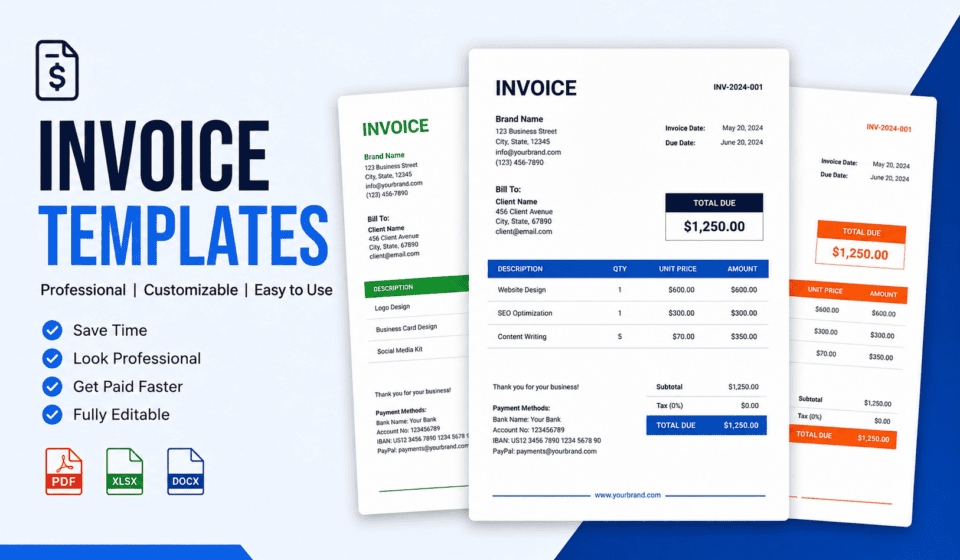

An invoice is more than just a document requesting payment. It is an important part of your business communication, cash flow management, and professional image. Whether you are a freelancer, consultant, agency owner, contractor, online seller, or small business owner, creating clear and professional invoices can help you get paid faster and maintain organized financial records.
Invoice templates make the invoicing process much easier. Instead of creating a new invoice from scratch every time you complete a project or sell a product, you can use a professionally designed template and simply update the customer information, services, prices, taxes, and payment details.
In this guide, we will explain what invoice templates are, why they are important, what information an invoice should contain, the different types of invoice templates, and how you can create an effective invoice for your business.
What Is an Invoice Template?
An invoice template is a pre-designed document that businesses and professionals can use to create invoices quickly and consistently.
A typical invoice template includes spaces for important information such as:
- Business name and logo
- Business contact information
- Customer information
- Invoice number
- Invoice date
- Due date
- Product or service descriptions
- Quantity
- Price
- Subtotal
- Taxes
- Discounts
- Total amount
- Payment instructions
- Terms and conditions
- Notes or thank-you messages
Invoice templates can be created in many formats, including Microsoft Word, Microsoft Excel, Google Docs, Google Sheets, PDF, and specialized invoicing software.
The main purpose of a template is to save time while ensuring that every invoice contains the information customers need.
Why Are Invoice Templates Important?
Professional invoicing is essential for businesses of all sizes. A poorly designed invoice can cause confusion, payment delays, and unnecessary communication with customers.
Using a good invoice template provides several advantages.
1. Saves Time
Creating an invoice from scratch for every customer can take a significant amount of time. With a template, the basic structure is already prepared.
You only need to update the customer details, services or products, prices, and payment information.
For freelancers and small businesses that send many invoices each month, this can save hours of administrative work.
2. Creates a Professional Image
Your invoice is often one of the final documents a customer receives after working with your business.
A clean and professional invoice shows that your business is organized and trustworthy.
Adding your business logo, brand colors, contact information, and consistent formatting can also help strengthen your brand identity.
3. Reduces Mistakes
A reusable invoice template can help prevent missing important information.
Instead of remembering every field each time you create an invoice, the template provides a structured format that reminds you what information needs to be included.
This can reduce common errors such as missing invoice numbers, incorrect totals, missing due dates, or incomplete customer information.
4. Makes Payment Easier
A good invoice clearly explains how much the customer owes and when payment is expected.
Including payment methods such as bank transfer, credit card, online payment services, or other accepted methods can make it easier for customers to pay.
The easier you make the payment process, the less likely customers are to delay payment because they are unsure what to do.
5. Improves Record Keeping
Invoices are important financial records. Keeping organized copies of invoices can make it easier to track sales, revenue, outstanding payments, and business expenses.
A consistent invoice numbering system also makes it easier to find specific transactions later.
Essential Elements of a Professional Invoice
Although invoice designs can vary depending on the business, most professional invoices should contain several essential elements.
Business Information
Start the invoice with your business information.
This may include:
- Business name
- Logo
- Business address
- Phone number
- Email address
- Website
- Tax or business identification information, when applicable
Make sure your contact information is easy to find.
Customer Information
The invoice should clearly identify the customer.
Include information such as:
- Customer name
- Company name, if applicable
- Billing address
- Email address
- Phone number, if needed
For business-to-business transactions, including the correct company and billing information is particularly important.
Invoice Number
Every invoice should have a unique invoice number.
For example:
- INV-001
- INV-002
- INV-003
- 2026-001
- 2026-002
A consistent numbering system makes invoices easier to track and organize.
Invoice Date
The invoice date tells the customer when the invoice was issued.
This is particularly important when payment terms are based on the invoice date.
Due Date
Clearly display the payment due date.
For example:
Payment Due: September 10, 2026
A specific due date is much clearer than simply writing “Payment due soon.”
Description of Products or Services
The invoice should explain what the customer is paying for.
For example:
| Description | Quantity | Rate | Amount |
|---|---|---|---|
| Website Design | 1 | $800 | $800 |
| Website Hosting Setup | 1 | $100 | $100 |
| SEO Consultation | 2 | $75 | $150 |
A detailed description helps customers understand exactly what they are being charged for.
Subtotal, Tax, Discount, and Total
Your invoice should clearly calculate the final amount.
A typical structure is:
Subtotal: $1,050
Discount: $50
Tax: $100
Total: $1,100
Make the final amount prominent so the customer can immediately see how much they need to pay.
Payment Instructions
Tell customers how they can pay.
For example:
Payment Methods: Bank Transfer, Credit Card, or Online Payment
You can also include relevant payment account information or a payment link where appropriate.
Popular Types of Invoice Templates
Different businesses have different invoicing needs. As a result, there are many types of invoice templates available.
Freelance Invoice Template
Freelancers often invoice clients for services such as:
- Web design
- Graphic design
- Writing
- Digital marketing
- Consulting
- Programming
- Video editing
- Photography
A freelance invoice template should clearly show the services provided, hourly or project rates, hours worked when relevant, and the final amount due.
Small Business Invoice Template
A small business invoice template is suitable for companies providing products or services to customers.
It can include the company’s branding, payment terms, tax information, and detailed product or service descriptions.
Service Invoice Template
Service-based businesses can use service invoice templates to bill customers for professional work.
Examples include consultants, agencies, repair companies, cleaning services, and contractors.
Consulting Invoice Template
Consultants often charge by the hour, day, project, or retainer.
A consulting invoice template can include the consultation period, hours worked, hourly rate, project details, and expenses.
Sales Invoice Template
Businesses selling physical or digital products can use sales invoice templates to document purchases.
These invoices typically include product names, quantities, unit prices, taxes, discounts, shipping costs, and the final total.
Recurring Invoice Template
Some businesses provide ongoing services and charge customers regularly.
Examples include:
- Website maintenance
- Hosting
- Software subscriptions
- Marketing services
- Monthly consulting
- Membership services
A recurring invoice template makes it easier to maintain consistent billing information.
Simple Invoice Template
Not every business needs a complicated invoice.
A simple invoice template may contain only the essential information:
- Business details
- Customer details
- Invoice number
- Date
- Description
- Amount
- Total
- Payment instructions
Simple invoices are especially useful for freelancers and small businesses that want a clean and easy-to-understand design.
How to Create an Effective Invoice Template
Creating an invoice template does not have to be complicated.
Step 1: Add Your Business Branding
Place your business logo and name at the top of the invoice.
Use fonts and colors that match your website and other business materials.
Consistent branding makes your business appear more professional.
Step 2: Create a Clear Information Hierarchy
The most important information should be easy to find.
The invoice number, invoice date, due date, and total amount should stand out from less important information.
Avoid filling the page with unnecessary graphics or decorative elements.
Step 3: Use a Clear Table
For multiple products or services, use a table.
Common columns include:
- Item
- Description
- Quantity
- Rate
- Amount
Tables make invoices easier to read and reduce confusion.
Step 4: Clearly Highlight the Total
The customer should not have to search through the invoice to find the final amount.
Use a separate total section and make the amount visually prominent.
Step 5: Add Payment Terms
Explain when and how you expect to receive payment.
Examples include:
- Due upon receipt
- Net 15
- Net 30
- Net 60
Only use payment terms that accurately reflect your agreement with the customer.
Step 6: Include a Professional Note
A short note at the bottom of the invoice can create a positive customer experience.
For example:
Thank you for your business!
You can also use the notes section to provide additional instructions or information.
Invoice Templates for Freelancers
Freelancers can benefit significantly from using invoice templates.
When working with multiple clients, creating invoices manually can become repetitive. A standardized template allows freelancers to quickly create professional invoices while maintaining consistent branding.
For example, a web designer might create an invoice with:
Website Design — $1,200
Responsive Development — $800
SEO Setup — $300
The freelancer can then save the template and reuse it for future clients.
A professional invoice can also help freelancers establish clearer boundaries around payment terms and project costs.
Invoice Templates for Small Businesses
Small businesses often need invoices that provide more detailed information than a basic freelance invoice.
A small business invoice may include:
- Company logo
- Business registration details
- Customer billing information
- Product or service details
- Tax information
- Shipping costs
- Discounts
- Payment terms
- Return or refund information
A reusable template makes it easier for employees to create consistent invoices.
Digital vs. Printable Invoice Templates
Invoice templates can be designed for both digital and printed use.
Digital Invoices
Digital invoices are commonly sent through email or online invoicing systems.
PDF is a popular format because it preserves the document’s appearance across different devices.
Digital invoices can also include clickable payment links, which can make the payment process faster.
Printable Invoices
Some businesses still provide printed invoices, especially for retail, construction, professional services, and in-person transactions.
A printable invoice should use a clean layout that remains readable when printed in black and white.
Common Invoice Mistakes to Avoid
Even a professional-looking invoice can create problems if important information is missing.
Here are some common mistakes to avoid.
Missing Invoice Numbers
Every invoice should have a unique identifier.
Without invoice numbers, tracking payments can become difficult.
Unclear Payment Due Dates
Avoid vague phrases such as “Pay as soon as possible.”
Instead, provide a specific due date or clearly stated payment terms.
Incorrect Calculations
Double-check quantities, rates, taxes, discounts, and totals before sending an invoice.
Calculation errors can damage customer trust.
Missing Contact Information
Customers should know how to contact you if they have questions about the invoice.
Include an email address or other appropriate contact method.
Poor Design
An invoice does not need to be flashy, but it should be clean and easy to read.
Avoid excessive colors, complicated graphics, tiny text, and unnecessary information.
Sending Editable Files When a PDF Is Better
For many business situations, PDF is preferable because it helps preserve the layout and reduces accidental changes.
Keep an editable master template separately and send customers a finalized version when appropriate.
Best Practices for Using Invoice Templates
To get the most value from invoice templates, follow a few simple best practices.
Keep your template consistent. Use the same basic structure for your invoices.
Use sequential invoice numbers. This makes tracking easier.
Save copies of sent invoices. Maintain organized financial records.
Check every invoice before sending it. Verify customer details, services, amounts, and due dates.
Make payment instructions obvious. Customers should know exactly how to pay.
Use professional file names. For example, Invoice-2026-001-ClientName.pdf is much easier to identify than invoice-final-new.pdf.
Update your template when necessary. Business information, payment methods, tax requirements, and terms may change over time.
Where Can You Use Invoice Templates?
Invoice templates are useful across many industries.
They can be used by:
- Freelancers
- Web designers
- Graphic designers
- Digital marketers
- Consultants
- Photographers
- Writers
- Developers
- Contractors
- Coaches
- Agencies
- Retail businesses
- Online stores
- Service providers
- Small businesses
- Home-based businesses
Regardless of your industry, the basic goal remains the same: clearly communicate what the customer owes and how they can pay.
Final Thoughts
Invoice templates are a simple but powerful tool for improving business administration. They save time, create a consistent professional appearance, reduce mistakes, and make it easier to manage payments and financial records.
The best invoice template is not necessarily the most complicated one. It is the one that clearly presents the information your customers need while making the payment process simple.
Whether you are a freelancer sending your first invoice or an established business processing hundreds of transactions, a well-designed invoice template can make your billing process more efficient.
Start with the essential information: your business details, customer information, invoice number, date, due date, description of products or services, pricing, total amount, and payment instructions. Then customize the design to match your brand.
With the right invoice template, you can spend less time creating invoices and more time focusing on your customers, projects, and business growth.