
A professional portfolio is one of the most powerful tools you can use to attract clients, demonstrate your skills, and build credibility online. Whether you are a web designer, graphic designer, developer, digital marketer, writer, photographer, or freelancer, your portfolio can often make a stronger impression than a traditional résumé.
However, simply creating a portfolio website is not enough. Your portfolio needs to present the right information, projects, proof, and calls to action in a clear and professional way.
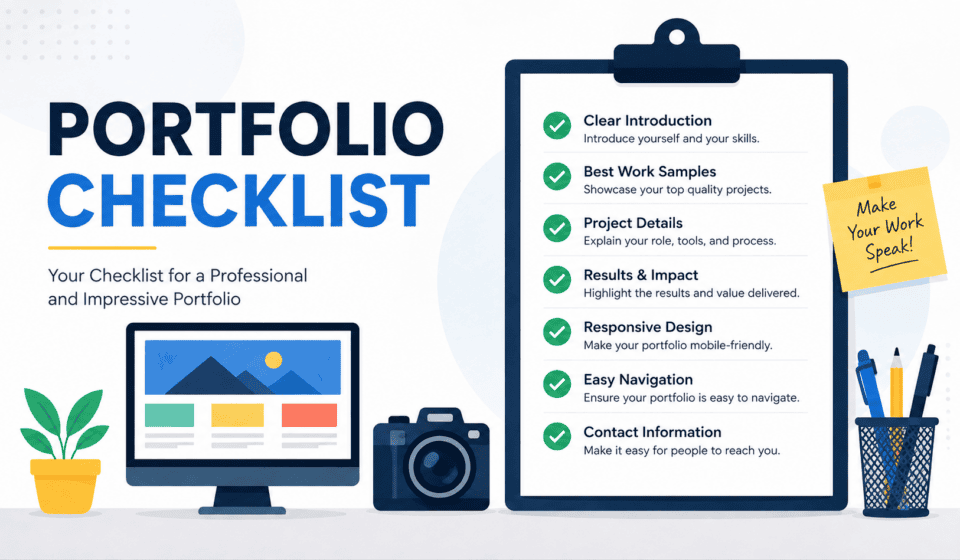
This portfolio checklist will help you make sure your portfolio has everything it needs to attract potential clients and turn visitors into inquiries.
What Is a Portfolio?
A portfolio is a collection of your best professional work, skills, experience, and achievements. It gives potential clients or employers an opportunity to see what you can actually do.
For freelancers, a portfolio is particularly important because clients usually want evidence of your abilities before hiring you. Instead of simply saying, “I am a professional web designer,” your portfolio can show examples of websites you have designed.
A strong portfolio should answer three basic questions:
- Who are you?
- What can you do?
- Why should someone hire you?
If your portfolio clearly answers these questions, visitors are more likely to trust you and contact you.
Why You Need a Professional Portfolio
A portfolio can help you establish credibility and differentiate yourself from competitors.
When potential clients visit your website, they may compare you with several other freelancers. A well-organized portfolio can demonstrate your experience and give visitors confidence in your abilities.
A good portfolio can help you:
- Showcase your best work
- Build professional credibility
- Attract new clients
- Demonstrate your skills
- Generate leads
- Increase your online visibility
- Build your personal brand
- Support your freelance business
- Make it easier for clients to understand your services
For beginners, a portfolio is also an opportunity to demonstrate potential. You don’t necessarily need dozens of paid projects. You can create personal projects, practice projects, redesign concepts, or sample projects to demonstrate your skills.
Complete Portfolio Checklist
Use the following checklist before publishing or updating your portfolio website.
1. Professional Homepage
Your homepage is usually the first page visitors see, so it needs to make a strong first impression.
Your homepage should immediately communicate who you are and what you offer.
For example:
“I’m a WordPress Web Designer Helping Small Businesses Build High-Converting Websites.”
A strong homepage should include:
- Your name or brand
- Your professional title
- A short value proposition
- A professional photo or relevant visual
- Your primary services
- Selected portfolio projects
- A call-to-action
- Contact information
Avoid making visitors guess what you do.
2. Clear Professional Introduction
Your portfolio should include a short introduction explaining who you are.
Don’t write a huge biography on your homepage. Instead, provide a concise introduction that tells visitors your profession, experience, specialization, and the type of clients you help.
For example, a web designer could introduce themselves as:
“I’m a freelance WordPress web designer specializing in modern, responsive websites for small businesses, entrepreneurs, and personal brands.”
Keep the introduction simple and client-focused.
3. Professional Profile Photo
A professional photo can make your portfolio feel more personal and trustworthy.
If you are building a personal brand, consider including a high-quality professional headshot on your homepage or About page.
Your photo should be:
- Clear
- Professional
- High resolution
- Appropriate for your industry
- Consistent with your personal brand
Avoid using blurry, heavily edited, or unrelated photographs.
4. Strong About Page
Your About page gives potential clients more information about you.
It can include:
- Your professional background
- Your experience
- Your education or training
- Your specialties
- Your work philosophy
- Your achievements
- Your professional goals
- Your interests, when relevant
However, remember that your portfolio is ultimately about your clients.
Instead of only explaining your history, explain how your experience helps clients achieve better results.
5. List Your Services
Visitors should easily understand what you can do for them.
Create a dedicated Services section or page.
For example, a web designer might offer:
- WordPress Website Design
- Website Redesign
- Landing Page Design
- Responsive Web Design
- WordPress Maintenance
- Website Speed Optimization
- SEO Setup
- Website Security
- WooCommerce Development
Keep your service descriptions short and easy to understand.
6. Showcase Your Best Projects
Your portfolio should focus on quality rather than quantity.
You don’t need to display every project you have ever completed. Select projects that demonstrate your strongest skills and are relevant to the type of clients you want to attract.
For each project, include:
- Project name
- Project type
- Client or industry
- Your role
- Services provided
- Project description
- Images or screenshots
- Results, if available
- Link to the live project, when appropriate
Your best work should appear first.
7. Create Detailed Case Studies
A portfolio becomes much more persuasive when you explain the process behind your projects.
Instead of simply showing a screenshot, create case studies.
A basic case study can follow this structure:
Challenge → Strategy → Process → Solution → Result
For example, explain:
- What problem did the client have?
- What did you change?
- Why did you choose your approach?
- What tools did you use?
- What was the final result?
Case studies help potential clients understand how you think and solve problems.
8. Include Results and Achievements
Whenever possible, show measurable results.
For example:
- Increased website traffic by 45%
- Improved page speed
- Increased conversion rate
- Generated more leads
- Reduced bounce rate
- Increased social engagement
- Improved search visibility
Specific results are more convincing than general statements.
If you don’t have measurable results yet, focus on the improvements you made and clearly describe the project’s objectives.
9. Display Your Skills
Your portfolio should make your professional skills easy to understand.
For a web designer, skills might include:
- WordPress
- HTML
- CSS
- JavaScript
- Elementor
- WooCommerce
- Responsive Design
- SEO
- Website Performance
Don’t create a massive list of every tool you’ve ever used.
Focus on skills that are relevant to your services and target clients.
10. Add Client Testimonials
Testimonials can significantly improve trust.
Ask satisfied clients to provide short testimonials about their experience working with you.
A good testimonial should ideally mention:
- The client’s problem
- Your service
- Their experience
- The result
Whenever possible, include the client’s name, job title, company, and photo—with permission.
Authentic testimonials are much more valuable than generic statements.
11. Include Client Logos
If you have worked with recognizable businesses or organizations, consider displaying their logos.
A simple section such as:
“Trusted by Businesses and Entrepreneurs”
can provide additional social proof.
Only use company logos when you have permission or the appropriate right to display them.
12. Add a Clear Call-to-Action
Your portfolio should tell visitors what to do next.
Don’t assume visitors will automatically contact you.
Use clear calls-to-action such as:
- Get a Free Consultation
- Request a Quote
- Start Your Project
- Hire Me
- Contact Me
- Book a Consultation
- Discuss Your Project
Place calls-to-action throughout your website, especially after important sections.
13. Make Your Contact Information Easy to Find
Don’t hide your contact details.
Your portfolio should have a dedicated Contact page and ideally include contact options in your header or footer.
Consider providing:
- Contact form
- Professional email
- Social media profiles
- Business messaging option
- Booking link, if applicable
Make contacting you as easy as possible.
14. Use a Professional Domain Name
A custom domain gives your portfolio a more professional appearance.
Instead of relying entirely on a free subdomain, consider using a domain based on your name, brand, or business.
Examples include:
yourname.com
yourbrand.com
yournamewebdesign.com
Choose something short, memorable, and easy to spell.
15. Make Your Portfolio Mobile-Friendly
Many visitors will access your website using smartphones.
Your portfolio should work properly on:
- Desktop computers
- Laptops
- Tablets
- Smartphones
Check your website on multiple screen sizes.
Pay particular attention to:
- Navigation
- Text size
- Buttons
- Images
- Contact forms
- Portfolio galleries
- Page spacing
A portfolio that looks great on desktop but is difficult to use on mobile can lose potential clients.
16. Improve Website Speed
Website performance affects user experience.
Large images, unnecessary plugins, poorly optimized themes, and excessive scripts can slow down your portfolio.
To improve performance:
- Compress images
- Use modern image formats when appropriate
- Minimize unnecessary plugins
- Use caching
- Optimize CSS and JavaScript
- Choose reliable hosting
- Remove unnecessary website elements
Your portfolio should load quickly and feel responsive.
17. Optimize Your Portfolio for SEO
Search engine optimization can help potential clients discover your portfolio through Google and other search engines.
Optimize important pages for relevant keywords.
For example, instead of simply using:
“My Services”
you might use:
“WordPress Web Design Services”
depending on your target audience and keyword strategy.
Pay attention to:
- Page titles
- Meta descriptions
- Headings
- URLs
- Image alt text
- Internal links
- Relevant keywords
- Helpful content
Avoid keyword stuffing. Write naturally for people first.
18. Add Social Media Profiles
Social media can help visitors learn more about your professional work.
Depending on your industry, you might include profiles on platforms such as:
- YouTube
- X
- Behance
- Dribbble
Only include platforms that you actively maintain and that support your professional brand.
19. Include Your Resume or CV
Some clients and employers may want more detailed information about your experience.
Consider providing a downloadable résumé or CV.
Your résumé can include:
- Professional experience
- Education
- Certifications
- Skills
- Employment history
- Major achievements
Keep it current and make sure the information matches your portfolio.
20. Display Certifications and Training
Certifications can provide additional credibility.
If you have completed relevant courses or professional certifications, display the most important ones.
Examples might include certifications related to:
- Web design
- Digital marketing
- SEO
- Google tools
- WordPress
- Advertising
- Analytics
- Project management
Don’t overwhelm visitors with every certificate you’ve ever received. Prioritize relevant credentials.
21. Keep Your Design Consistent
Your portfolio itself should demonstrate your design abilities.
Maintain consistency across:
- Colors
- Typography
- Buttons
- Spacing
- Images
- Icons
- Headings
- Navigation
A clean and consistent design creates a more professional experience.
22. Remove Outdated Content
An outdated portfolio can hurt your credibility.
Review your portfolio regularly and remove:
- Old projects
- Broken links
- Outdated services
- Incorrect contact information
- Old testimonials
- Expired offers
- Poor-quality work
Your portfolio should represent your current skills.
23. Check Every Link and Form
Before publishing your portfolio, test everything.
Click every important link and make sure your forms work correctly.
Check:
- Navigation links
- Portfolio links
- Social media links
- Contact forms
- Email links
- Download buttons
- Call-to-action buttons
A broken contact form could mean losing a potential client.
24. Add a Privacy Policy and Required Legal Pages
If your website collects personal information through contact forms, analytics, cookies, newsletter subscriptions, or other tools, make sure your website has appropriate privacy and legal information for your audience and jurisdiction.
Depending on your website, you may also need pages such as:
- Privacy Policy
- Terms and Conditions
- Cookie information
- Disclaimer
For legal requirements, consider getting advice appropriate to your location and business.
25. Create a Simple Portfolio Navigation
Visitors should be able to find information quickly.
Keep your main navigation simple.
A typical portfolio navigation might include:
Home | About | Services | Portfolio | Blog | Contact
You can adjust this structure depending on your business.
Avoid adding too many menu items.
Portfolio Checklist for Beginners
If you’re a beginner and don’t have many professional projects, don’t wait until you have dozens of clients.
Start building your portfolio immediately.
You can include:
- Personal projects
- Practice websites
- Redesign concepts
- Sample landing pages
- Mock branding projects
- Volunteer projects
- Student projects
- Demo websites
- Case studies based on realistic scenarios
The important thing is to clearly identify sample or personal projects rather than presenting them as paid client work.
Quality and relevance matter more than the number of projects.
Portfolio Checklist for Freelancers
Freelancers should make their portfolio particularly client-focused.
Ask yourself:
Can a potential client understand what I offer within a few seconds?
Your freelance portfolio should clearly communicate:
- Your specialty
- Your target clients
- Your services
- Your experience
- Your best projects
- Your results
- Your testimonials
- Your pricing approach, when appropriate
- How clients can contact you
You should also make the next step obvious.
For example:
“Have a website project in mind? Let’s discuss your goals.”
Then provide a clear contact button.
Final Portfolio Checklist
Before launching your portfolio, go through this quick checklist:
☐ Professional homepage
☐ Clear professional introduction
☐ Professional profile photo
☐ About page
☐ Services section
☐ Best projects showcased
☐ Detailed case studies
☐ Project results
☐ Skills listed
☐ Client testimonials
☐ Client logos, where permitted
☐ Strong calls-to-action
☐ Easy-to-find contact information
☐ Professional domain name
☐ Mobile-friendly design
☐ Fast-loading pages
☐ SEO optimization
☐ Social media links
☐ Updated résumé or CV
☐ Relevant certifications
☐ Consistent branding
☐ Updated content
☐ Working links and forms
☐ Appropriate legal pages
☐ Simple navigation
Conclusion
A professional portfolio is more than a gallery of your work. It is a sales and credibility tool that can help potential clients understand your expertise, see the quality of your work, and decide whether they want to work with you.
The best portfolio isn’t necessarily the one with the most projects. It is the one that clearly communicates who you help, what you do, how you solve problems, and why clients should trust you.
If you’re a beginner, start with a small portfolio and improve it over time. If you’re an experienced freelancer, regularly update your projects, case studies, testimonials, and results.
Use this portfolio checklist whenever you create or update your website. By covering the essential elements—from professional branding and project showcases to mobile optimization, SEO, testimonials, and contact options—you can create a portfolio that looks professional and works harder to generate opportunities.
Your portfolio should not simply say that you are good at what you do.
It should prove it.