
Designing a modern website or mobile application from scratch can take a significant amount of time. Designers need to create buttons, forms, navigation menus, cards, icons, dashboards, typography systems, and many other interface elements before they can even begin working on the complete user experience.
This is where free UI kits can make a huge difference.
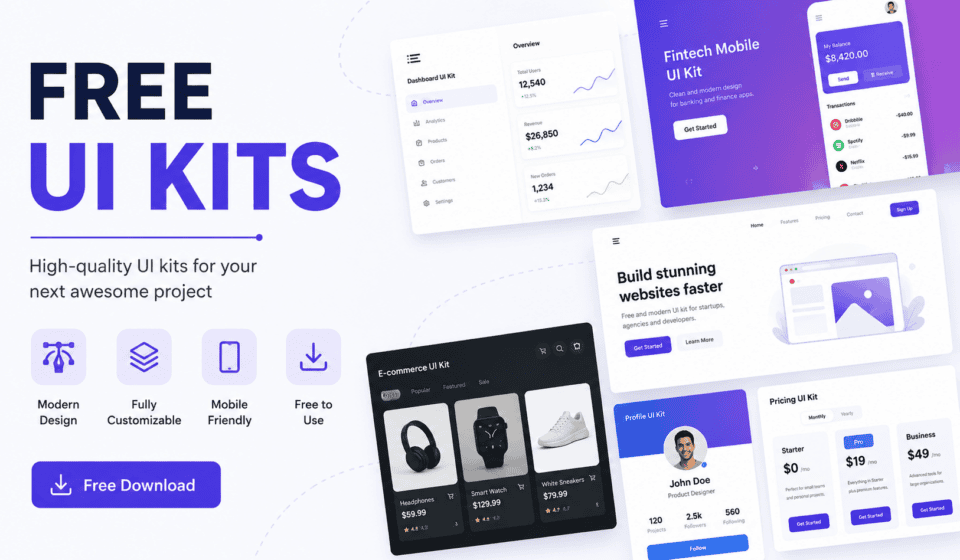
A UI kit is a collection of pre-designed user interface elements that designers can use to create websites, mobile apps, dashboards, landing pages, and digital products more efficiently. Instead of designing every component from the beginning, you can start with professionally designed elements and customize them according to your project’s needs.
The best part is that many high-quality UI kits are available for free.
In this guide, we’ll explain what free UI kits are, why designers use them, what they usually include, where to find them, how to choose the right kit, and how to use them effectively in your next web or app design project.
What Is a UI Kit?
A UI kit, or User Interface Kit, is a collection of reusable design components created to help designers build digital interfaces.
A typical UI kit may contain elements such as:
- Buttons
- Navigation bars
- Forms
- Input fields
- Cards
- Modals
- Checkboxes
- Radio buttons
- Dropdown menus
- Tabs
- Tables
- Alerts
- Pricing sections
- Login screens
- Profile sections
- Dashboard components
- Mobile app screens
- Icons
- Typography styles
- Color palettes
UI kits are commonly created for design tools such as Figma, Adobe XD, Sketch, and Photoshop.
Instead of creating every interface element manually, designers can copy, customize, and combine components from a UI kit to create complete layouts.
For example, if you’re designing a SaaS website, you might use a UI kit containing a navigation bar, hero section, pricing cards, buttons, forms, and dashboard components. You can customize these elements and build your design much faster.
What Are Free UI Kits?
Free UI kits are UI design resources that designers can download and use without paying for the kit itself.
They are particularly useful for:
- Beginner designers
- Web designers
- UI/UX designers
- Freelancers
- Students
- Developers
- Startup teams
- Digital marketers
- Website owners
- Design agencies
Some free UI kits are simple collections of individual components, while others are complete design systems containing hundreds of components and multiple screens.
However, “free” does not always mean that every type of usage is permitted. Some resources are free for personal projects but require a license or attribution for commercial work.
Always check the license before using a free UI kit in a client or commercial project.
Why Should Designers Use Free UI Kits?
There are several reasons why UI kits have become popular among modern designers.
1. Save Design Time
One of the biggest benefits of using a UI kit is saving time.
Creating a button may seem simple, but a professional design system usually needs multiple button states, including:
- Default
- Hover
- Active
- Disabled
- Loading
- Focus
The same applies to forms, menus, cards, and other components.
A UI kit provides these elements in advance, allowing designers to focus more on layout, usability, branding, and user experience.
2. Improve Design Consistency
Consistency is an important part of professional UI design.
If every button, form field, card, and heading is designed differently, the interface can look unorganized.
A good UI kit provides consistent:
- Colors
- Typography
- Spacing
- Border radius
- Shadows
- Component styles
- Icon styles
This makes it easier to maintain a consistent visual language throughout the website or application.
3. Great for Beginners
Free UI kits are especially valuable for people who are learning web design or UI/UX design.
Beginners can study professionally designed components and understand how different interface elements are structured.
For example, a beginner can examine a UI kit to learn:
- How buttons are designed
- How spacing is used
- How forms are organized
- How cards are structured
- How typography is combined
- How color systems work
Rather than simply copying the design, beginners can use these resources as learning tools.
4. Speed Up Client Projects
Freelance designers often work with tight deadlines.
Starting every project from a completely blank canvas can make projects unnecessarily slow.
A UI kit provides a foundation that can be customized for different clients.
For example, a designer might start with a dashboard UI kit and customize the:
- Brand colors
- Logo
- Typography
- Icons
- Layout
- Content
- Components
This can significantly reduce the time required to create the initial design.
5. Experiment With Different Design Styles
UI kits are also useful when exploring different design styles.
You can experiment with:
- Minimalist UI
- Modern UI
- Glassmorphism
- Neumorphism
- Material-inspired interfaces
- Dark mode
- SaaS dashboards
- E-commerce interfaces
- Mobile applications
This makes UI kits useful during the research and exploration stage of a project.
What Is Usually Included in a Free UI Kit?
The contents vary from one UI kit to another, but many include a large collection of reusable components.
Buttons
Buttons are one of the most common UI components.
A kit may include primary, secondary, outline, text, icon, rounded, and disabled buttons.
Forms
Forms can include:
- Text fields
- Password fields
- Search fields
- Dropdowns
- Checkboxes
- Radio buttons
- Toggles
- Date pickers
Cards
Cards are commonly used for:
- Products
- Blog posts
- Services
- Pricing plans
- User profiles
- Statistics
- Projects
A UI kit can provide several card variations that can be customized for different layouts.
Navigation
Navigation components may include:
- Desktop navigation bars
- Mobile menus
- Sidebars
- Breadcrumbs
- Tabs
- Pagination
- Footer layouts
Modals and Popups
Many kits include modal windows for:
- Login forms
- Confirmation messages
- Notifications
- Product details
- Settings
- Alerts
Dashboard Components
Dashboard UI kits can contain:
- Statistics cards
- Charts
- Tables
- User lists
- Activity feeds
- Side navigation
- Reports
- Analytics panels
These can be particularly useful when designing admin panels and SaaS applications.
Best Design Tools for Using UI Kits
Different UI kits are created for different design applications.
Figma
Figma is one of the most popular tools for modern UI design. Many free UI kits are available specifically for Figma.
Figma’s component and auto-layout features make it particularly useful for creating and customizing UI systems.
Adobe XD
Adobe XD has also been used extensively for interface design, and many UI resources are available in XD format.
However, designers should check whether a particular resource is compatible with the current version of their software.
Sketch
Sketch remains an important tool within the UI/UX design ecosystem, particularly for designers working on macOS.
Some UI kits are specifically created for Sketch and may contain symbols and reusable components.
Photoshop
Older UI kits are often available as PSD files. These can still be useful, especially when working with visual mockups, but component-based tools such as Figma can provide a more efficient workflow for modern interface design.
Where Can You Find Free UI Kits?
There are many websites and design communities where designers can discover free UI resources.
Some platforms specialize in UI kits, while others provide broader design resources such as templates, icons, illustrations, wireframes, and design systems.
When searching for a free UI kit, use specific keywords such as:
- Free Figma UI kit
- Free website UI kit
- Free mobile UI kit
- Free dashboard UI kit
- Free SaaS UI kit
- Free e-commerce UI kit
- Free landing page UI kit
- Free design system
- Free wireframe kit
Searching by project type can help you find resources that are much more relevant to your needs.
How to Choose the Right Free UI Kit
Not every free UI kit is worth downloading. Some may be outdated, poorly organized, or difficult to customize.
Here are several things to check.
1. Check the Design Quality
Look at the overall visual quality before downloading the kit.
Check whether:
- Typography is well structured
- Spacing is consistent
- Components look professional
- Colors work together
- Layouts are balanced
- Components are properly aligned
A high-quality UI kit should demonstrate good design principles.
2. Check the File Format
Make sure the kit works with your design software.
For example, if you primarily use Figma, look for a Figma-compatible UI kit rather than downloading a PSD file.
3. Check the License
This is extremely important.
Some free UI kits allow:
- Personal use
- Commercial use
- Client projects
- Modification
Others may require attribution or restrict commercial usage.
Before using a UI kit for a paid project, read its license carefully.
4. Check Whether Components Are Editable
A good UI kit should be easy to customize.
Look for:
- Components
- Variants
- Auto layout
- Organized layers
- Reusable styles
- Design tokens
- Clearly named elements
A poorly organized file can take longer to customize than designing the component yourself.
5. Check for Updates
Design trends and software features change over time.
A recently updated UI kit may provide better compatibility and more modern components than an old resource.
How to Use a Free UI Kit Effectively
Downloading a UI kit is only the first step. The real value comes from knowing how to use it properly.
Step 1: Understand the Project
Before opening the UI kit, understand what you’re designing.
Determine:
- Who the target users are
- What the website or app does
- What actions users need to perform
- What pages are required
- What brand style should be used
Step 2: Select Relevant Components
Don’t use every component just because it is available.
Choose only the elements that solve a real design requirement.
For example, a simple portfolio website may not need complex dashboard tables or advanced analytics components.
Step 3: Customize the Branding
Replace generic styles with the project’s brand identity.
Customize:
- Logo
- Colors
- Fonts
- Icons
- Images
- Border radius
- Shadows
- Button styles
This helps transform a generic UI kit into a unique interface.
Step 4: Create a Design System
Once you select your components, establish consistent design rules.
Define:
- Primary colors
- Secondary colors
- Font families
- Font sizes
- Spacing
- Button styles
- Border radius
- Shadows
This will make the entire project easier to manage.
Step 5: Test the User Experience
A beautiful interface isn’t automatically a good interface.
Test whether users can easily:
- Navigate the website
- Find important information
- Complete forms
- Understand buttons
- Read the content
- Complete important tasks
Usability should always be more important than decoration.
Free UI Kits vs. Designing From Scratch
Both approaches have advantages.
Designing from scratch provides complete creative control, but it can take considerably more time.
Free UI kits provide a starting point and help accelerate the design process.
For many projects, the best approach is a combination of both.
You can use a UI kit for common components while designing unique sections specifically for the project.
For example, you could use a UI kit for buttons, forms, cards, and navigation while creating a custom homepage, hero section, and brand-specific components.
This approach provides both speed and originality.
Are Free UI Kits Good for Professional Projects?
Yes, free UI kits can be used as part of professional design workflows, provided that their licenses allow the intended use.
However, designers should avoid treating a free UI kit as a finished website.
A professional project still requires:
- User research
- Information architecture
- UX planning
- Custom branding
- Responsive design
- Accessibility
- Usability testing
- Content strategy
- Developer collaboration
A UI kit is a resource—not a replacement for good design thinking.
Common Mistakes When Using Free UI Kits
Copying Everything Without Customization
One common mistake is using an entire UI kit exactly as provided.
This can make a website look generic and similar to hundreds of other projects.
Customize the components to match the project’s brand and audience.
Ignoring Responsive Design
A desktop component may not automatically work well on mobile devices.
Always check how your interface behaves across:
- Desktop
- Laptop
- Tablet
- Mobile
Using Too Many Components
More components don’t necessarily mean better design.
Use only what the user actually needs.
Ignoring Accessibility
Color contrast, keyboard navigation, readable typography, labels, and focus states are important for accessible interfaces.
Accessibility should be considered from the beginning rather than added at the end.
Forgetting the License
Never assume that a resource labeled “free” can automatically be used for every commercial purpose.
Always check the creator’s licensing terms.
Benefits of Free UI Kits for Freelancers
Freelancers can benefit significantly from free UI resources.
A freelancer may need to create multiple websites or applications for different clients every month. Having a library of quality UI resources can help speed up the design process.
Free UI kits can help freelancers:
- Create initial concepts faster
- Build prototypes quickly
- Demonstrate ideas to clients
- Reduce repetitive work
- Explore design alternatives
- Maintain consistency
- Meet deadlines more easily
The time saved can then be invested in strategy, UX research, content, and client communication.
Benefits for Students and New Designers
For students and new designers, UI kits can be excellent educational resources.
Instead of simply downloading and using a kit, students should study how it was created.
Try rebuilding individual components yourself.
For example, take a button from a UI kit and recreate it from scratch. Then compare your version with the original.
You can learn about:
- Alignment
- Spacing
- Typography
- Color
- Hierarchy
- Component states
- Responsive behavior
This turns a free UI kit into a practical learning resource.
Tips for Building Your Own UI Kit
After working with several free UI kits, you may eventually want to create your own.
Start by collecting the components you frequently use.
Create reusable versions of:
- Buttons
- Forms
- Cards
- Navigation
- Typography
- Icons
- Alerts
- Modals
- Tables
Then organize them into categories.
Use consistent naming conventions and reusable components. Over time, your personal UI kit can become a valuable asset for future projects.
Final Thoughts
Free UI kits are powerful resources for web designers, UI/UX designers, freelancers, developers, students, and startup teams. They can reduce repetitive work, accelerate prototyping, improve consistency, and provide inspiration for modern digital interfaces.
However, a UI kit should be treated as a starting point rather than a shortcut to good design.
The best results come from combining UI resources with strong design principles, thoughtful user experience, responsive layouts, accessibility, and project-specific branding.
Whether you’re designing a landing page, SaaS dashboard, e-commerce store, mobile application, or personal portfolio, the right free UI kit can help you move from a blank canvas to a professional interface much faster.
Start by finding a UI kit that matches your project, check its license, customize the components, and then focus on creating an experience that is useful, accessible, and easy to use.
With the right workflow, free UI kits can become one of the most valuable resources in your web design toolkit.