
Search engine optimization (SEO) is one of the most effective ways to increase organic traffic, attract potential customers, and grow a website without depending entirely on paid advertising. However, SEO involves many different tasks, and it can be difficult to know whether your website is fully optimized.
That is why having a practical SEO checklist is so useful.
Whether you are launching a new website, optimizing an existing WordPress website, or working on SEO for clients, a checklist helps you identify important optimization opportunities and avoid common mistakes.
In this guide, you will learn the essential SEO tasks you should complete for your website, including keyword research, on-page SEO, technical SEO, content optimization, image SEO, internal linking, mobile optimization, local SEO, and ongoing monitoring.
What Is an SEO Checklist?
An SEO checklist is a collection of tasks that help ensure a website follows important search engine optimization practices.
SEO can generally be divided into three major areas:
- On-page SEO – Optimizing pages, content, titles, headings, images, URLs, and internal links.
- Technical SEO – Improving crawling, indexing, website speed, mobile usability, security, and site structure.
- Off-page SEO – Building authority through backlinks, brand mentions, digital PR, and other external signals.
A good SEO checklist combines all three areas.
You do not need to complete every task at once. Instead, use the checklist as a roadmap and work through the most important issues first.
1. Set Up Essential SEO Tools
Before starting your SEO work, make sure your website is connected to the tools you need to monitor its performance.
Important tools include:
- Google Search Console
- Google Analytics
- A keyword research tool
- An SEO plugin for WordPress
- A website speed testing tool
- A backlink analysis tool
Google Search Console is especially important because it provides information about how Google crawls and indexes your website. You can use it to identify indexing problems, monitor search queries, inspect URLs, and review search performance.
For WordPress websites, an SEO plugin can also make many optimization tasks easier.
2. Perform Keyword Research
Keyword research should be the foundation of your SEO strategy.
Keywords are the words and phrases people type into search engines when looking for information, products, or services.
For example, a web design business might target keywords such as:
- web design services
- WordPress web design
- website design for small businesses
- responsive web design
- affordable website design
Look for keywords that are relevant to your audience and have realistic ranking opportunities.
Do not focus only on keywords with the highest search volume. Highly competitive keywords can be difficult for a new website to rank for.
Instead, consider targeting long-tail keywords that are more specific.
For example:
Broad keyword:
“web design”
Long-tail keyword:
“best web design services for small businesses”
Long-tail keywords often have clearer search intent and can attract more targeted visitors.
3. Understand Search Intent
Finding keywords is only part of the process. You also need to understand what users expect when they search for those keywords.
Search intent generally falls into several categories:
- Informational
- Navigational
- Commercial
- Transactional
For example, someone searching for “how to create a WordPress website” probably wants educational information.
Someone searching for “WordPress web design agency” may be comparing service providers.
Someone searching for “buy WordPress hosting” is showing stronger transactional intent.
Create content that matches the searcher’s intent. If Google users are looking for a tutorial, publishing a sales page may not satisfy their needs.
4. Optimize Your Page Title
Your page title is one of the most important on-page SEO elements.
A good title should:
- Clearly describe the page
- Include the primary keyword naturally
- Encourage users to click
- Be unique
- Accurately represent the content
For example:
Weak title:
“SEO Tips”
Better title:
“SEO Checklist: 25 Essential Steps to Optimize Your Website”
Avoid stuffing multiple keywords into the title. Write for humans first while making the topic clear to search engines.
5. Write a Strong Meta Description
A meta description summarizes what a webpage is about.
Although the meta description itself is not generally treated as a direct ranking factor, a well-written description can help improve the likelihood that users click your result.
A good meta description should:
- Describe the page accurately
- Include the primary topic naturally
- Communicate a benefit
- Encourage clicks
- Be unique for each page
For example:
“Follow this complete SEO checklist to optimize your WordPress website, improve search visibility, and attract more organic traffic.”
Avoid writing descriptions that are misleading or stuffed with keywords.
6. Create SEO-Friendly URLs
Your URLs should be simple, descriptive, and easy to understand.
For example:
Good:example.com/seo-checklist/
Less useful:example.com/page?id=12345
Keep URLs short when possible and use words that describe the page.
Avoid unnecessary numbers, symbols, and complicated URL structures.
If you are creating a new page, choose the URL carefully because changing URLs later can require redirects.
7. Optimize Your Headings
Headings make your content easier to read and help search engines understand its structure.
Use:
- One main H1 heading
- H2 headings for major sections
- H3 headings for supporting subsections
For example:
H1: SEO Checklist
H2: On-Page SEO Checklist
H3: Optimize Your Page Title
H3: Improve Your Meta Description
Avoid using headings simply to make text appear larger. Headings should represent the actual structure of your content.
8. Create High-Quality Content
High-quality content is at the heart of successful SEO.
Your content should provide real value to the reader rather than simply attempting to manipulate search rankings.
Before publishing an article, ask:
- Does it answer the user’s question?
- Is the information accurate?
- Is it easy to understand?
- Does it provide useful examples?
- Does it cover the topic sufficiently?
- Is it better or more useful than competing pages?
Avoid creating content just to target keywords.
Instead, focus on solving problems and answering questions.
9. Use Keywords Naturally
Once you identify your primary keyword, use it naturally throughout your content.
You may include the topic in:
- Page title
- H1 heading
- Introduction
- Subheadings where appropriate
- Body content
- URL
- Image alt text when relevant
- Meta description
However, do not repeat the same keyword unnaturally.
Keyword stuffing can make your content difficult to read and can create a poor user experience.
Use related terms and natural language to explain the topic comprehensively.
10. Add Internal Links
Internal links connect one page on your website to another page on the same website.
They can help:
- Users discover related content
- Search engines understand your site structure
- Distribute authority between pages
- Keep visitors engaged
- Create useful content relationships
For example, an article about SEO could link to related articles about keyword research, technical SEO, WordPress optimization, and link building.
Use descriptive anchor text rather than generic phrases such as “click here.”
11. Optimize Images
Images can improve your content, but large and poorly optimized images can slow down your website.
Before uploading an image:
- Compress it
- Use an appropriate file format
- Give it a descriptive filename
- Add meaningful alt text when appropriate
- Use suitable dimensions
- Avoid unnecessarily large files
For example, instead of:
IMG12345.jpg
use something descriptive such as:
seo-checklist-wordpress.jpg
Alt text should describe the image accurately when the image conveys useful information.
Do not use alt text as an opportunity to stuff keywords.
12. Improve Website Speed
Website performance is important for both users and SEO.
Slow websites can frustrate visitors and increase the likelihood that they leave before viewing your content.
To improve website speed:
- Compress images
- Use caching
- Minify unnecessary files
- Remove unused plugins
- Use a reliable hosting provider
- Optimize databases
- Reduce unnecessary scripts
- Consider using a content delivery network
Test your website regularly, especially after installing new plugins or making major design changes.
13. Make Your Website Mobile-Friendly
A large percentage of internet users browse websites on mobile devices.
Your website should work properly on:
- Smartphones
- Tablets
- Laptops
- Desktop computers
Check that:
- Text is easy to read
- Buttons are easy to tap
- Navigation works properly
- Images fit the screen
- Forms work on mobile
- Pages do not require horizontal scrolling
A responsive WordPress theme can make mobile optimization much easier.
14. Use HTTPS
Your website should use HTTPS rather than an unsecured HTTP connection.
HTTPS encrypts communication between the visitor and your website and is an important part of website security.
After installing an SSL certificate, make sure all important pages load correctly over HTTPS and that your website does not contain unnecessary mixed-content issues.
15. Create a Logical Site Structure
A clear website structure makes it easier for both visitors and search engines to navigate your site.
Organize content into logical categories.
For example, a digital marketing website might have:
Digital Marketing
- SEO
- Content Marketing
- Social Media Marketing
- Email Marketing
Web Design
- WordPress
- Responsive Design
- UX Design
- Website Maintenance
Avoid creating complicated navigation structures where important pages are buried several levels deep.
16. Create an XML Sitemap
An XML sitemap helps search engines discover important URLs on your website.
Most modern WordPress SEO plugins can automatically generate a sitemap.
After creating your sitemap, check that it contains the URLs you actually want search engines to discover.
You can also submit your sitemap through Google Search Console.
Remember that having a sitemap does not guarantee that every URL will be indexed. It simply helps search engines discover your site’s content.
17. Check Indexing
A page cannot receive organic search traffic if it is not properly indexed.
Regularly check your website for indexing problems.
Common causes of indexing problems include:
- Accidental noindex directives
- Incorrect robots.txt settings
- Broken pages
- Canonicalization problems
- Duplicate content
- Server errors
- Poor site structure
Google Search Console can help identify many of these issues.
18. Fix Broken Links and Errors
Broken links can create a poor experience for visitors and make your website harder to navigate.
Regularly check for:
- Broken internal links
- Broken external links
- 404 pages
- Redirect chains
- Incorrect redirects
When you remove or permanently move a page that has useful backlinks or traffic, consider setting up an appropriate 301 redirect to a relevant replacement page.
Do not redirect every deleted URL to your homepage if a more relevant destination exists.
19. Use Canonical URLs Correctly
If similar or duplicate versions of a page exist, search engines may have difficulty determining which URL should be treated as the primary version.
Canonical URLs can help communicate your preferred version.
For example, URL variations caused by tracking parameters may create multiple versions of what is essentially the same content.
Make sure canonical settings are configured correctly, particularly on larger WordPress websites and e-commerce sites.
20. Build Quality Backlinks
Backlinks are links from other websites to your website.
High-quality, relevant backlinks can help strengthen your website’s authority.
Focus on earning links through:
- Useful original content
- Digital PR
- Expert contributions
- Industry resources
- Original research
- Helpful guides
- Business partnerships
- Legitimate directories
Avoid buying large quantities of low-quality backlinks or participating in manipulative link schemes.
One relevant, trustworthy link can be more valuable than hundreds of poor-quality links.
21. Optimize for Local SEO
If you serve customers in a particular city, region, or service area, local SEO can be extremely valuable.
Important local SEO tasks include:
- Creating and optimizing your Google Business Profile
- Keeping your business information consistent
- Collecting genuine customer reviews
- Creating location-specific pages when useful
- Adding local business information to your website
- Building relevant local citations
Make sure your business name, address, phone number, and other important information are accurate and consistent.
22. Add Useful Schema Markup
Structured data, commonly called schema markup, can help search engines understand specific types of content.
Depending on your website, useful structured data may include:
- Article
- Organization
- Local Business
- Product
- Event
- FAQ
Only use structured data that accurately represents the content on the page.
Do not add misleading schema simply to try to obtain enhanced search results.
23. Update Old Content
SEO is not a one-time task.
Some articles become outdated as information, statistics, products, technologies, and search behavior change.
Review older content regularly.
Update:
- Outdated information
- Broken links
- Screenshots
- Statistics
- Examples
- Titles
- Internal links
- Images
If an old article already receives traffic and backlinks, improving it can sometimes be more effective than creating an entirely new article.
24. Monitor Your SEO Performance
You cannot improve what you do not measure.
Track important metrics such as:
- Organic traffic
- Search impressions
- Click-through rate
- Keyword rankings
- Indexed pages
- Conversions
- Backlinks
- Top-performing pages
Use analytics and search performance data to understand which content attracts visitors and which pages need improvement.
Do not judge SEO success based only on rankings. Traffic quality and conversions are also important.
25. Create a Regular SEO Audit Schedule
Finally, turn your checklist into a routine.
A simple schedule could look like this:
Weekly SEO Tasks
- Check important website errors
- Monitor search performance
- Review new content
- Check major indexing problems
Monthly SEO Tasks
- Review keyword performance
- Check broken links
- Analyze top-performing pages
- Review website speed
- Update important content
- Review backlinks
Quarterly SEO Tasks
- Perform a technical SEO audit
- Review website structure
- Analyze competitors
- Refresh older content
- Review keyword strategy
- Identify new content opportunities
Regular maintenance helps prevent small SEO problems from becoming major issues.
SEO Checklist: Quick Summary
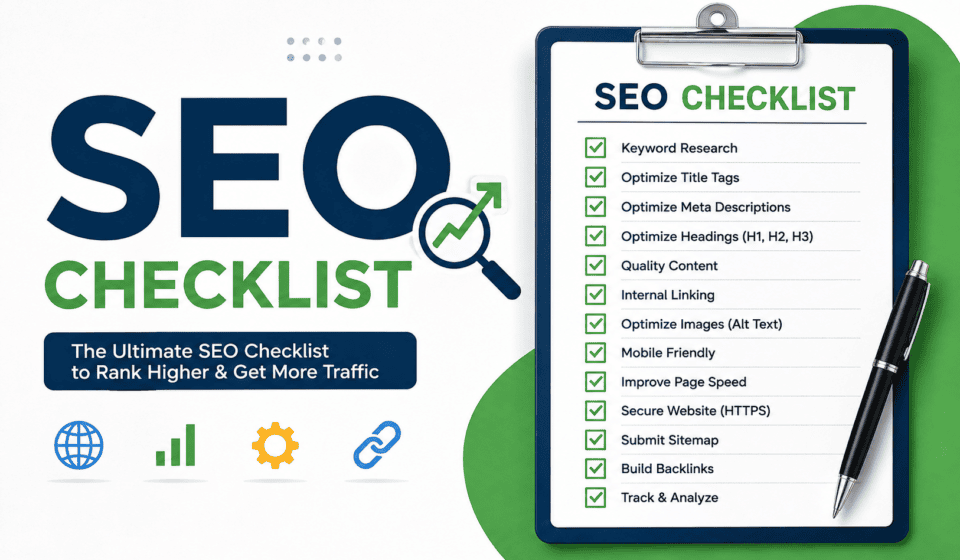
Before publishing or auditing a page, use this quick checklist:
- Perform keyword research
- Understand search intent
- Write a useful page title
- Create a compelling meta description
- Use a clean URL
- Optimize headings
- Create helpful original content
- Use keywords naturally
- Add relevant internal links
- Optimize images
- Improve page speed
- Check mobile usability
- Use HTTPS
- Maintain a logical site structure
- Create an XML sitemap
- Check indexing
- Fix broken links
- Review canonical URLs
- Earn quality backlinks
- Optimize local SEO when relevant
- Use appropriate structured data
- Update outdated content
- Monitor SEO performance
- Perform regular SEO audits
Final Thoughts
SEO can seem complicated because it involves many different activities, but you do not need to optimize everything simultaneously.
Start with the fundamentals: keyword research, search intent, useful content, on-page optimization, technical SEO, mobile usability, website speed, internal linking, and ongoing monitoring.
For WordPress websites, a combination of a reliable SEO plugin, Google Search Console, analytics, and a consistent content strategy can make SEO management much easier.
The most important principle is to focus on your users. Create content that answers their questions, make your website fast and easy to navigate, and ensure search engines can properly discover and understand your pages.
Use this SEO checklist whenever you publish a new article, create a landing page, launch a website, or perform a website audit. Over time, consistent optimization can help your website build stronger organic visibility and attract more relevant visitors from search engines.