
Launching a website is an exciting milestone, whether you are creating a personal portfolio, business website, online store, blog, or professional service website. However, simply publishing your website is not enough. A website that launches with broken links, slow pages, missing SEO settings, poor mobile responsiveness, or security problems can create a bad first impression and lose potential visitors and customers.
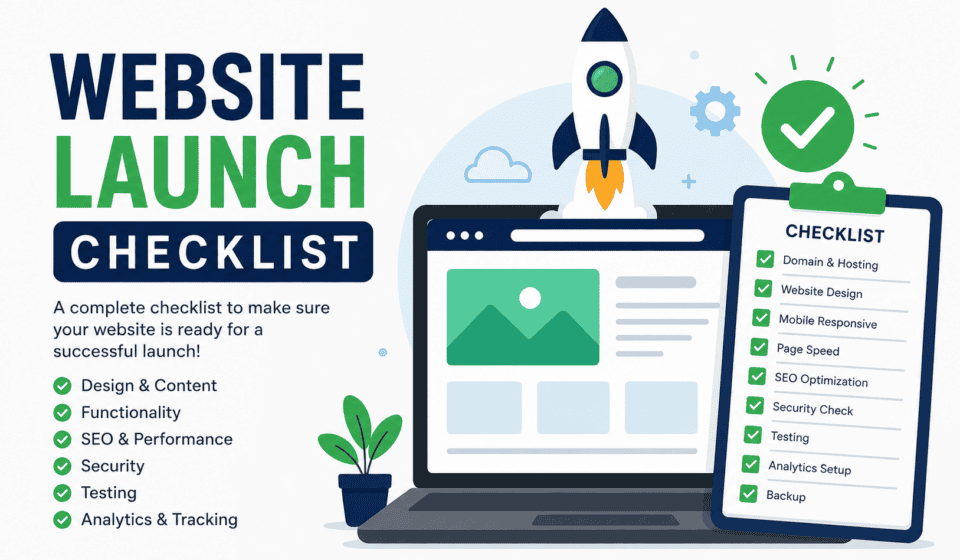
A website launch checklist helps you review everything before making your website public. From design and content to SEO, performance, security, analytics, and marketing, every important area should be checked before launch.
In this guide, you will learn exactly what to check before launching a website, including a practical pre-launch checklist you can use for your next WordPress website.
Why Do You Need a Website Launch Checklist?
A website contains many different elements that work together. You may have dozens of pages, images, forms, buttons, menus, plugins, tracking codes, and SEO settings.
It is easy to overlook a small problem during development.
For example, you might accidentally launch a website with:
- Broken links
- Placeholder text
- Missing images
- Incorrect contact information
- Slow-loading pages
- Poor mobile design
- Missing SEO titles and descriptions
- Unoptimized images
- Security vulnerabilities
- Incorrect website URLs
- Broken contact forms
- Missing analytics tracking
- No backup system
A checklist gives you a systematic way to review the entire website before launch.
Instead of asking, “Is my website finished?” ask, “Have I checked every important part of my website?”
Complete Website Launch Checklist
Use the following checklist before launching your website.
1. Check Your Website Design
The first thing visitors notice is your website’s design. Your website should look professional, consistent, and easy to navigate.
Review every important page and check the following:
- Is the design visually professional?
- Is your branding consistent?
- Are your colors consistent?
- Are fonts easy to read?
- Are headings clearly visible?
- Is there enough white space?
- Are buttons easy to identify?
- Are important calls to action visible?
- Does the website look trustworthy?
Your homepage should immediately communicate who you are, what you offer, and what visitors should do next.
Avoid overcrowding the homepage with too much information. Use clear sections that guide visitors through your message.
For a business website, important sections may include:
- Hero section
- Services
- Benefits
- About section
- Testimonials
- Portfolio or case studies
- Frequently asked questions
- Call-to-action section
- Contact information
2. Test Website Navigation
Website navigation should make it easy for visitors to find the information they need.
Check your main navigation menu carefully.
Make sure:
- Every menu item works.
- Dropdown menus work correctly.
- Important pages are easy to find.
- The logo links to the homepage.
- Mobile navigation works.
- There are no unnecessary menu items.
A visitor should not have to search through several pages to find your contact information.
Consider including important pages such as:
- Home
- About
- Services
- Blog
- Portfolio
- Contact
- Privacy Policy
- Terms and Conditions
Depending on your website, you may need additional pages.
3. Review All Website Content
Before launch, read every page carefully.
Content errors can make an otherwise professional website look unfinished.
Check for:
- Spelling mistakes
- Grammar errors
- Duplicate content
- Placeholder text
- Incorrect information
- Outdated information
- Missing headings
- Missing paragraphs
- Incorrect business names
- Incorrect phone numbers
- Incorrect email addresses
Pay special attention to text such as “Lorem ipsum,” “Coming soon,” “Insert text here,” and other temporary content.
Make sure all website content is written for your target audience.
Your content should answer important visitor questions:
Who are you?
What do you offer?
Who is your service for?
Why should visitors choose you?
How can visitors contact or purchase from you?
4. Check Every Page
Do not check only the homepage.
Visit every important page on your website.
Create a list of your URLs and manually inspect each one.
Check:
- Page title
- Main heading
- Content
- Images
- Links
- Buttons
- Forms
- Layout
- Mobile responsiveness
- SEO settings
- Footer
- Calls to action
This is especially important for websites with many pages.
A single broken service page can cost you potential customers even when the homepage works perfectly.
5. Test All Links
Broken links are one of the most common website launch problems.
Click every important link on your website.
Check:
- Navigation links
- Internal links
- External links
- Blog links
- Button links
- Social media links
- Footer links
- Image links
- Download links
Make sure links lead to the correct destinations.
Also check for links that accidentally point to development URLs, temporary pages, or staging websites.
If you have deleted pages, make sure visitors are redirected appropriately instead of receiving unnecessary 404 errors.
6. Test Contact Forms
Contact forms are extremely important for business websites.
A beautiful website is not useful if customers cannot contact you.
Test every form yourself.
Submit test messages and confirm that:
- The form submits successfully.
- Required fields work.
- Error messages appear correctly.
- Confirmation messages work.
- Email notifications arrive.
- The correct recipient receives the message.
- Automatic confirmation emails work if configured.
- Spam protection works.
If your website uses a booking, quote, application, or newsletter form, test those forms as well.
Never assume a form works simply because it looks correct.
7. Check Mobile Responsiveness
A large percentage of website visitors use smartphones and tablets.
Your website should therefore work properly on different screen sizes.
Check the website on:
- Desktop
- Laptop
- Tablet
- Smartphone
Look for:
- Text that is too small
- Buttons that are too close together
- Images extending outside the screen
- Horizontal scrolling
- Broken menus
- Overlapping elements
- Incorrect spacing
- Cut-off content
- Slow mobile loading
Do not simply resize the browser window and assume everything is perfect. Test important pages on actual mobile devices whenever possible.
8. Improve Website Speed
Website performance can affect user experience, conversions, and search visibility.
Before launch, check your website’s performance.
Look for unnecessary:
- Plugins
- Large images
- Heavy scripts
- Animations
- Fonts
- Videos
- Third-party integrations
Compress images before uploading them.
Use modern image formats when appropriate and avoid uploading enormous images when a smaller version would work.
You should also consider:
- Browser caching
- Page caching
- Image optimization
- Content delivery networks
- Minification
- Lightweight themes
- Optimized hosting
The goal is not simply to achieve a perfect performance score. The goal is to create a website that loads quickly and provides a smooth experience for visitors.
9. Optimize Images
Images are an important part of modern websites, but poorly optimized images can significantly increase page size.
Before launch, check every important image.
Make sure:
- Images are compressed.
- Images have appropriate dimensions.
- File names are descriptive.
- Important images have alternative text.
- Images are not unnecessarily large.
- Decorative images are handled appropriately.
For example, instead of using a file name such as:
IMG_1234.jpg
use something descriptive such as:
website-launch-checklist.jpg
Descriptive file names can also help you organize your media library.
10. Complete Your SEO Settings
Search engine optimization should be part of your website launch process.
Before launch, make sure every important page has an appropriate SEO title and meta description.
Check:
- SEO titles
- Meta descriptions
- Headings
- URLs
- Internal links
- Image alt text
- XML sitemap
- Robots.txt
- Canonical URLs
- Indexing settings
Your page titles should clearly describe the page.
For example:
Website Launch Checklist: 30+ Things to Check Before Going Live
is more descriptive than:
Home Page
Make sure your important pages are not accidentally marked as “noindex.”
This is a common mistake on websites that were developed on staging environments.
11. Check Your WordPress Settings
If you are launching a WordPress website, review your WordPress settings before going live.
Check:
- Site title
- Tagline
- WordPress URL
- Site URL
- Time zone
- Date format
- Permalink structure
- User accounts
- Comment settings
- Reading settings
One particularly important setting is your website’s search engine visibility.
If your website was intentionally hidden from search engines during development, remember to update the setting when you launch.
12. Review Your WordPress Plugins
Plugins provide powerful functionality, but too many unnecessary plugins can increase maintenance and security risks.
Before launch, review every installed plugin.
Ask:
- Do I really need this plugin?
- Is it updated?
- Is it compatible with my WordPress version?
- Does it duplicate another plugin?
- Is it maintained by a reliable developer?
Delete unused plugins rather than simply leaving them inactive.
Also update your active plugins before launch, but test the website after updating them.
13. Check WordPress Theme and Custom Code
Make sure your WordPress theme is properly configured.
Check:
- Header
- Footer
- Typography
- Colors
- Buttons
- Templates
- Blog layout
- Archive pages
- 404 page
- Search results
- Custom CSS
- Custom JavaScript
If you have added custom code, test the website carefully.
A small code change can sometimes affect multiple pages.
14. Install an SSL Certificate
Your website should use HTTPS.
Check that your website loads correctly with:
https://
rather than only:
http://
Make sure there are no mixed-content warnings caused by insecure resources.
Your SSL certificate should be valid and properly configured.
HTTPS helps protect information transmitted between visitors and your website and is an essential standard for modern websites.
15. Review Website Security
Security should be checked before launch, not after your website has already been attacked.
Use strong passwords for administrator accounts.
Review your WordPress users and remove unnecessary accounts.
Also consider:
- Two-factor authentication
- Security plugins
- Login protection
- Regular updates
- Secure hosting
- Malware monitoring
- Automatic backups
Do not use “admin” as an administrator username if you can avoid it.
Only give users the permissions they actually need.
16. Set Up Website Backups
Before launch, make sure you have a reliable backup system.
A backup can help you recover your website if something goes wrong.
Your backup strategy should ideally include:
- Website files
- Database
- Media files
- Theme files
- Important configuration
Test your backup process instead of assuming backups are working.
A backup that cannot be restored is not very useful.
17. Set Up Analytics
You should know what happens after visitors arrive at your website.
Set up an analytics solution appropriate for your website.
Track useful information such as:
- Visitors
- Traffic sources
- Popular pages
- User engagement
- Conversions
- Form submissions
- Downloads
- Sales
Make sure your tracking code is installed correctly.
Perform a test visit and confirm that the data is being recorded.
18. Connect Search Tools
Search engine webmaster tools can help you understand how your website appears in search results.
After launch, submit your sitemap and monitor indexing.
Pay attention to:
- Indexing problems
- Search queries
- Page visibility
- Mobile issues
- Technical errors
- Core performance signals
Do not expect a new website to rank immediately. SEO is a long-term process.
19. Check Legal Pages
Depending on your website and location, you may need legal and privacy-related pages.
Common pages include:
- Privacy Policy
- Terms and Conditions
- Cookie Policy
- Disclaimer
- Refund Policy
If you collect personal information through contact forms, newsletters, accounts, or purchases, make sure your privacy practices are clearly explained.
For legal compliance, consider getting professional legal advice appropriate to your business and target markets.
20. Test Your Website on Multiple Browsers
Your website may look perfect in one browser and have problems in another.
Test important pages using major browsers such as:
- Chrome
- Firefox
- Safari
- Edge
Also test different operating systems and screen sizes when possible.
Look specifically for layout problems, missing features, font issues, and JavaScript errors.
21. Check Your 404 Page
Visitors will eventually reach URLs that do not exist.
A useful 404 page should help them continue browsing.
Consider including:
- A friendly message
- Link to the homepage
- Search box
- Popular pages
- Main navigation
Instead of simply saying “Page Not Found,” help visitors find what they were looking for.
22. Check Calls to Action
Every important page should have a clear next step.
Depending on your website, your call to action might be:
- Contact us
- Book a consultation
- Get a quote
- Buy now
- Download the guide
- Subscribe
- Start learning
- Request information
Review your calls to action and make sure they are easy to see and understand.
23. Test the Website as a Real Visitor
One of the best final checks is to use the website like a new visitor.
Pretend you know nothing about the business.
Start at the homepage and ask:
Do I understand what this website offers within a few seconds?
Then try to complete important tasks.
For example:
- Find a service.
- Read about the business.
- Find pricing.
- Contact the business.
- Submit a form.
- Read a blog article.
- Find social media profiles.
If any process feels confusing, simplify it.
24. Create a Website Launch Day Checklist
Once all testing is complete, prepare for the actual launch.
On launch day:
- Take a final backup.
- Confirm the domain.
- Confirm hosting.
- Check SSL.
- Remove unnecessary maintenance messages.
- Confirm search engine visibility settings.
- Test important pages.
- Test forms.
- Check analytics.
- Check the sitemap.
- Confirm redirects.
- Test the website from an external connection.
After publishing, do another complete review.
Sometimes a website behaves differently after moving from a staging environment to production.
Website Launch Checklist: Quick Version
Here is a simple checklist you can save for future projects:
Design
- Professional design
- Consistent branding
- Easy navigation
- Clear calls to action
- Mobile responsive
Content
- All pages completed
- No placeholder text
- Grammar checked
- Contact information verified
- Images reviewed
Links and Forms
- Internal links tested
- External links tested
- Buttons tested
- Contact forms tested
- Email notifications tested
SEO
- SEO titles completed
- Meta descriptions completed
- URLs optimized
- Headings checked
- Image alt text reviewed
- Sitemap configured
- Indexing settings checked
Performance
- Images compressed
- Unnecessary plugins removed
- Caching configured
- Website speed tested
- Mobile performance checked
Security
- SSL enabled
- Strong passwords
- User accounts reviewed
- Plugins updated
- Theme updated
- Security measures configured
- Backups working
Tracking
- Analytics installed
- Search tools connected
- Conversion tracking configured
- Sitemap submitted
Final Launch
- Final backup completed
- Domain verified
- Website publicly accessible
- Important pages tested
- Forms tested again
- Website checked after launch
Final Thoughts
Launching a website successfully requires more than clicking the “Publish” button. A professional website should be tested from multiple perspectives, including design, content, usability, performance, SEO, security, and functionality.
A website launch checklist gives you a repeatable process that reduces mistakes and helps ensure your website is ready for real visitors.
Before launching your next WordPress website, take the time to review every item on this checklist. Test your forms, check your links, optimize your images, verify your SEO settings, configure analytics, secure your website, and create a reliable backup.
Most importantly, experience the website as a real visitor would. If visitors can quickly understand your message, navigate easily, find the information they need, and complete important actions without confusion, your website is in a much stronger position for launch.
Your website launch is only the beginning. After going live, continue monitoring performance, SEO, security, traffic, and user behavior. Regular improvements will help your website remain useful, competitive, and effective over the long term.