



15 Principles of Great Website Design
In today’s digital world, a website is much more than an online brochure—it’s the face of your business, your portfolio, and often the first interaction customers have with your brand. Whether you’re a freelancer, entrepreneur, coach, or large organization, great website design can significantly impact user experience, customer trust, and conversion rates.
A well-designed website doesn’t happen by accident. It follows proven principles that improve usability, aesthetics, accessibility, and performance. Great website design combines creativity with functionality, ensuring that visitors can easily find information and take action.
In this article, we’ll explore the 15 essential principles of great website design that every designer and business owner should understand.
1. Keep It Simple
Simplicity is the foundation of great website design. A cluttered website overwhelms users and makes navigation difficult. Visitors should instantly understand what your website offers.
How to achieve simplicity:
- Use a clean layout.
- Limit unnecessary elements.
- Avoid excessive colors and fonts.
- Focus on essential information.
- Remove distractions.
Remember: simplicity doesn’t mean boring—it means purposeful.
2. Create a Clear Visual Hierarchy
Visual hierarchy helps users understand the importance of different elements on your website. Important information should stand out and guide visitors naturally.
Ways to create visual hierarchy:
- Use larger headings.
- Apply contrasting colors.
- Use whitespace effectively.
- Position important content above the fold.
- Highlight call-to-action buttons.
A strong visual hierarchy improves readability and user engagement.
3. Prioritize User Experience (UX)
User experience is at the heart of successful website design. Visitors should be able to navigate your website effortlessly and accomplish their goals quickly.
Good UX practices:
- Keep navigation intuitive.
- Reduce the number of clicks.
- Use clear labels.
- Make forms simple.
- Ensure consistency.
A website that offers a positive user experience encourages users to stay longer and return in the future.
4. Design for Mobile Devices
More than half of internet traffic comes from smartphones and tablets. A website must work seamlessly on all screen sizes.
Mobile design best practices:
- Use responsive layouts.
- Optimize images.
- Make buttons touch-friendly.
- Use readable fonts.
- Test on multiple devices.
Mobile-first design is no longer optional—it’s essential.
5. Ensure Fast Loading Speed
Website speed directly affects user satisfaction, SEO rankings, and conversions. Slow websites frustrate users and increase bounce rates.
Improve website speed by:
- Compressing images.
- Using caching.
- Minimizing code.
- Reducing plugins.
- Choosing quality hosting.
Even a one-second delay can negatively impact user experience.
6. Use Consistent Branding
Consistency builds trust and strengthens brand recognition. Every page should reflect your brand identity.
Maintain consistency with:
- Brand colors.
- Typography.
- Logo placement.
- Tone of voice.
- Design elements.
Consistent branding creates a professional and memorable experience.
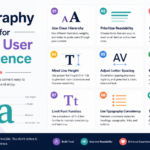
7. Use Effective Typography
Typography affects readability and user engagement. Good typography makes content easier to consume.
Typography guidelines:
- Use readable fonts.
- Limit font choices.
- Maintain proper spacing.
- Use appropriate font sizes.
- Create contrast between headings and body text.
Typography is not just about appearance; it’s about communication.
8. Embrace White Space
White space, also known as negative space, refers to the empty areas between design elements.
Benefits of white space:
- Improves readability.
- Reduces clutter.
- Highlights important elements.
- Creates balance.
- Enhances aesthetics.
White space allows your content to breathe and improves the overall user experience.
9. Use High-Quality Images and Visuals
Visual content attracts attention and makes websites more engaging. Poor-quality images can damage credibility.
Tips for using visuals:
- Use professional images.
- Optimize image size.
- Maintain consistency.
- Avoid generic stock photos.
- Use illustrations where appropriate.
Quality visuals enhance storytelling and strengthen your brand.
10. Create Clear Calls to Action (CTAs)
A website should guide users toward specific actions, such as signing up, making a purchase, or contacting you.
Effective CTA practices:
- Use action-oriented language.
- Make buttons prominent.
- Use contrasting colors.
- Place CTAs strategically.
- Keep the message concise.
Examples:
- Get Started
- Book a Consultation
- Download Now
- Contact Us
- Join Today
Strong CTAs increase conversions and drive business growth.
11. Focus on Accessibility
Accessibility ensures that everyone, including people with disabilities, can use your website.
Accessibility essentials:
- Use alt text for images.
- Ensure color contrast.
- Support keyboard navigation.
- Add captions to videos.
- Use semantic HTML.
An accessible website reaches a wider audience and improves usability for everyone.
12. Build Intuitive Navigation
Navigation acts as a roadmap for your website. Visitors should never feel lost.
Navigation best practices:
- Keep menus simple.
- Use descriptive labels.
- Limit menu items.
- Add a search feature.
- Maintain consistency.
Good navigation helps users find information quickly and improves engagement.
13. Optimize for Search Engines (SEO)
Even the most beautiful website won’t succeed if people can’t find it. Search engine optimization improves visibility.
SEO essentials:
- Use proper headings.
- Optimize page titles.
- Write quality content.
- Improve page speed.
- Add internal links.
- Optimize images.
SEO-friendly design attracts organic traffic and increases online visibility.
14. Establish Trust and Credibility
Visitors decide within seconds whether they trust your website. Building credibility is essential.
Ways to build trust:
- Display testimonials.
- Add contact information.
- Use secure HTTPS connections.
- Showcase certifications.
- Include case studies.
- Publish authentic content.
Trust is a key factor in converting visitors into customers.
15. Test and Continuously Improve
Website design is an ongoing process. User expectations and technology evolve constantly.
Improve your website through:
- A/B testing.
- Analytics tracking.
- User feedback.
- Heatmaps.
- Performance audits.
- Regular updates.
Continuous improvement ensures that your website remains effective and competitive.
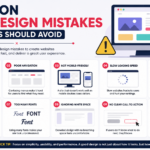
Common Website Design Mistakes to Avoid
Even experienced designers can make mistakes. Here are some common issues to watch out for:
- Too many colors and fonts.
- Slow loading pages.
- Confusing navigation.
- Poor mobile experience.
- Weak calls to action.
- Excessive pop-ups.
- Low-quality images.
- Lack of accessibility.
- Cluttered layouts.
- Inconsistent branding.
Avoiding these mistakes can dramatically improve user satisfaction.
Why Great Website Design Matters
Great website design affects every aspect of your online presence. A well-designed website can:
- Increase user engagement.
- Improve search rankings.
- Build trust.
- Strengthen branding.
- Increase conversions.
- Generate more leads.
- Improve customer satisfaction.
- Boost revenue.
Your website is often your most valuable digital asset, making good design an investment rather than an expense.
Final Thoughts
Great website design is the perfect balance between beauty and functionality. It’s not just about creating something visually appealing; it’s about designing experiences that help users achieve their goals effortlessly.
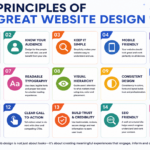
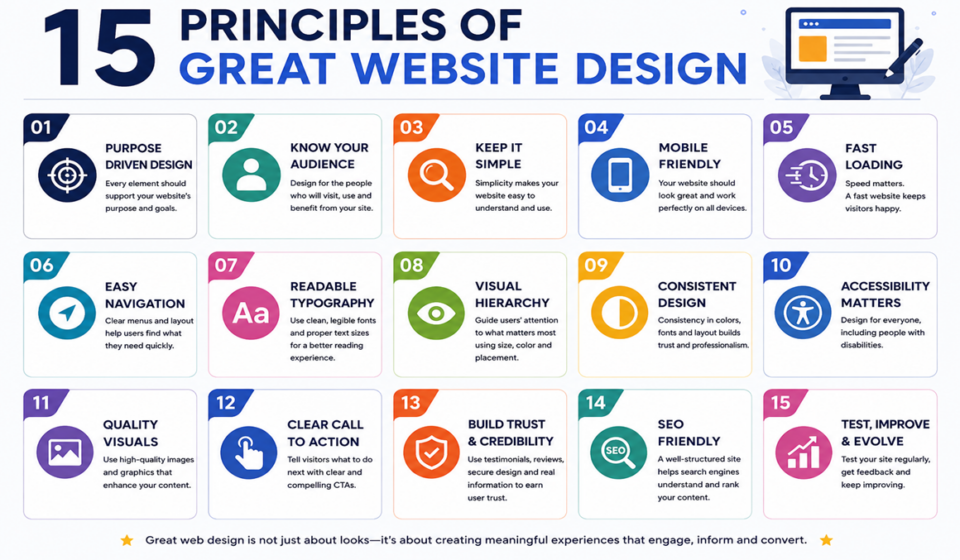
By following these 15 principles—simplicity, visual hierarchy, user experience, mobile responsiveness, speed, branding, typography, white space, visuals, calls to action, accessibility, navigation, SEO, trust, and continuous improvement—you can create websites that stand out in today’s competitive digital landscape.
Whether you’re building a personal portfolio, an e-commerce store, or a business website, these principles will help you design websites that are attractive, user-friendly, and effective.
Remember: the best websites are designed for people first and search engines second. Focus on your users, and success will follow.
