












HTML vs CSS: Understanding the Difference
If you are starting your journey in web development, you have probably heard about HTML and CSS. These two technologies are the foundation of every website on the internet. Whether you are building a personal blog, an e-commerce store, or a business website, understanding the difference between HTML and CSS is essential.
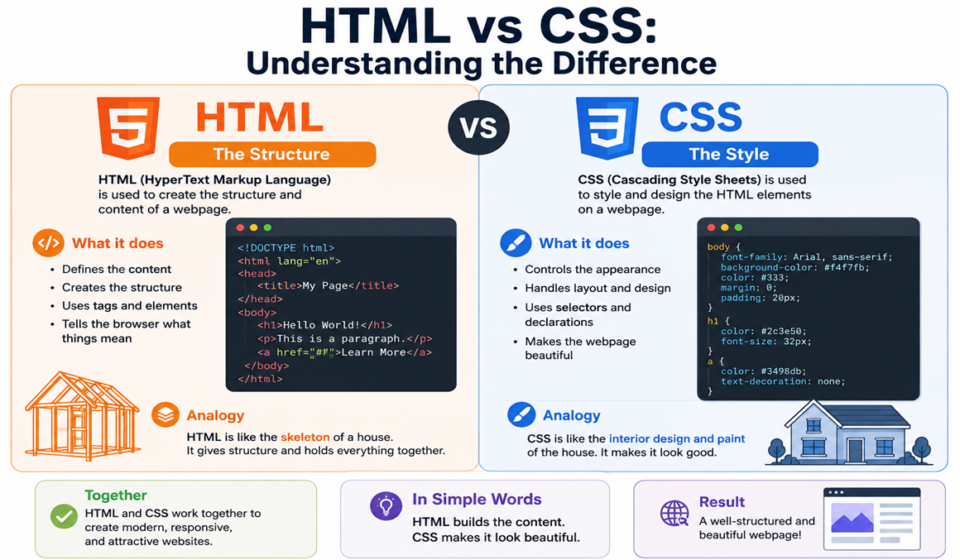
Although HTML and CSS work together, they serve completely different purposes. HTML creates the structure and content of a webpage, while CSS controls the appearance and layout of that content. Without HTML, a website would have no structure. Without CSS, websites would look plain and unattractive.
In this article, we will explore HTML and CSS in detail, understand their differences, examine practical examples, and learn how they work together to create modern websites.
What Is HTML?
HTML stands for HyperText Markup Language. It is the standard language used to create the structure of web pages.
HTML defines the different elements of a webpage, such as:
- Headings
- Paragraphs
- Images
- Links
- Lists
- Tables
- Forms
- Buttons
- Videos
Think of HTML as the skeleton of a human body. The skeleton provides the structure, but it does not determine the appearance. Similarly, HTML provides the framework of a webpage.
Basic HTML Example
<!DOCTYPE html>
<html>
<head>
    <title>My First Website</title>
</head>

<body>
    <h1>Welcome to My Website</h1>
    <p>This is my first webpage.</p>

    <a href="#">Click Here</a>
</body>
</html>
In this example:
<h1>creates a heading.<p>creates a paragraph.<a>creates a link.
Without CSS, the browser displays these elements using default styles.
What Is CSS?
CSS stands for Cascading Style Sheets. It is used to style and design web pages.
CSS controls:
- Colors
- Fonts
- Spacing
- Borders
- Backgrounds
- Layouts
- Animations
- Responsiveness
If HTML is the skeleton, CSS is the clothing, makeup, and decoration.
Basic CSS Example
h1 {
    color: blue;
    font-size: 40px;
}

p {
    color: gray;
    font-size: 18px;
}
This code changes:
- The heading color to blue.
- The paragraph color to gray.
- The font sizes.
CSS makes websites visually appealing and user-friendly.
HTML vs CSS: The Main Difference
The simplest way to understand the difference is:
- HTML creates the structure.
- CSS creates the design.
Imagine building a house:
- HTML is the walls, doors, and windows.
- CSS is the paint, furniture, and decorations.
Both are essential for creating a complete website.
Comparison Table: HTML vs CSS
| Feature | HTML | CSS |
|---|---|---|
| Full Form | HyperText Markup Language | Cascading Style Sheets |
| Purpose | Structure and content | Styling and design |
| Type | Markup language | Style sheet language |
| Controls | Text, images, links | Colors, fonts, spacing |
| File Extension | .html | .css |
| Dependency | Can exist without CSS | Needs HTML |
| Function | Builds webpages | Beautifies webpages |
Key Features of HTML
HTML offers several powerful features that make web development possible.
1. Easy to Learn
HTML uses simple tags that beginners can understand quickly.
Example:
<h1>Hello World</h1>2. Platform Independent
HTML works on all operating systems and browsers.
Examples:
- Windows
- macOS
- Linux
- Android
- iOS
3. Supports Multimedia
HTML allows developers to add:
- Images
- Videos
- Audio files
Example:
<img src="photo.jpg" alt="Image">4. Creates Forms
HTML forms collect information from users.
Example:
<form>
    <input type="text">
    <button>Submit</button>
</form>
Key Features of CSS
CSS offers many features that improve the appearance of websites.
1. Custom Colors
You can add colors easily.
body {
    background-color: lightblue;
}
2. Responsive Design
CSS helps websites adapt to different screen sizes.
@media (max-width: 768px) {
    body {
        font-size: 14px;
    }
}
3. Animations
CSS supports animations and transitions.
button {
    transition: 0.3s;
}

button:hover {
    background: red;
}
4. Flexible Layouts
CSS provides modern layout systems such as:
- Flexbox
- Grid
- Positioning
Example:
.container {
    display: flex;
}
How HTML and CSS Work Together
HTML and CSS work together to create modern websites.
HTML
<h1 class="title">Hello World</h1>CSS
.title {
    color: red;
    font-size: 50px;
}
The HTML creates the heading.
The CSS styles the heading.
The final result is a large red title.
Methods of Adding CSS to HTML
There are three ways to add CSS to an HTML document.
1. Inline CSS
<h1 style="color: blue;">Welcome</h1>Advantages:
- Quick and simple
Disadvantages:
- Difficult to maintain
2. Internal CSS
<style>
h1 {
    color: blue;
}
</style>
Advantages:
- Suitable for small websites
Disadvantages:
- Not ideal for large projects
3. External CSS
HTML:
<link rel="stylesheet" href="style.css">CSS:
h1 {
    color: blue;
}
Advantages:
- Easy to manage
- Faster loading
- Better organization
Disadvantages:
- Requires separate files
HTML Elements and Their CSS Styling
Here are some common HTML elements and their corresponding CSS styles.
| HTML Element | Purpose | CSS Property |
| h1 | Heading | font-size |
| p | Paragraph | color |
| img | Image | width |
| button | Button | background |
| div | Container | padding |
| a | Link | text-decoration |
Advantages of HTML
HTML offers several benefits.
Easy to understand
HTML uses readable tags.
Lightweight
HTML files are usually small.
Browser support
Every browser supports HTML.
SEO friendly
Search engines understand HTML structure.
Free to use
No license is required.
Advantages of CSS
CSS provides many advantages.
Better design
It improves visual appearance.
Reusable code
One CSS file can style many pages.
Faster websites
External stylesheets improve performance.
Responsive layouts
Websites work on mobile devices.
Easier maintenance
Changing one file updates the entire website.
Limitations of HTML
HTML also has limitations.
- No styling capabilities
- No animations
- Cannot create dynamic behavior
- Requires CSS and JavaScript
Limitations of CSS
CSS also has limitations.
- Depends on HTML
- Browser compatibility issues
- Complex layouts can be difficult
- Debugging large stylesheets takes time
HTML and CSS in Modern Web Development
Modern websites rely heavily on HTML and CSS.
Popular technologies that use HTML and CSS include:
- WordPress
- Bootstrap
- Tailwind CSS
- React
- Angular
- Vue.js
Every website uses HTML to define content and CSS to style it.
Examples include:
- News websites
- Blogs
- E-commerce stores
- Educational websites
- Business websites
- Social media platforms
Which One Should You Learn First?
Beginners should always learn HTML before CSS.
A recommended learning path is:
- Learn HTML basics.
- Understand tags and structure.
- Learn CSS styling.
- Practice layouts.
- Learn responsive design.
- Study JavaScript.
Understanding HTML first makes CSS much easier.
Best Practices for Using HTML and CSS
Follow these best practices:
Use semantic HTML
Use meaningful tags:
<header><main><section><footer>
Keep CSS organized
Separate styles into different files.
Use responsive design
Ensure websites work on all devices.
Avoid inline CSS
Use external stylesheets whenever possible.
Use descriptive class names
Example:
.main-header
.product-card
.footer-menu
Real-World Example
HTML:
<div class="card">
    <h2>Digital Marketing Course</h2>

    <p>Learn SEO, PPC, and social media marketing.</p>

    <button>Enroll Now</button>
</div>
CSS:
.card {
    width: 300px;
    padding: 20px;
    border-radius: 10px;
    background: #f5f5f5;
}

button {
    background: blue;
    color: white;
    padding: 10px;
}
HTML creates the course card.
CSS makes it attractive.
Conclusion
HTML and CSS are the building blocks of the web. HTML provides the structure and content, while CSS adds style and visual appeal. They are different technologies, but they work together to create beautiful, functional websites.
If you want to become a web developer, designer, or digital marketer, learning HTML and CSS is the first step. Start with HTML to understand webpage structure, then move to CSS to make your designs look professional.
Mastering these two technologies will open the door to modern web development and help you create websites that are both useful and visually impressive.
Whether you are building a blog, an online store, or a portfolio website, HTML and CSS are skills that every web professional should know.
