
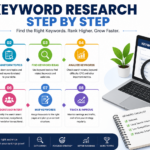














Keyword Research Step by Step
Keyword research is the foundation of every successful SEO campaign. Whether you’re building a new website, writing blog posts, running an eCommerce store, or creating YouTube videos, choosing the right keywords helps your content reach the right audience.
Many beginners make the mistake of writing content without researching what people are actually searching for. As a result, their content struggles to rank, receives little traffic, and generates few conversions.
This comprehensive guide will teach you keyword research step by step, from understanding search intent to finding low-competition keywords that can bring consistent organic traffic.
Table of Contents
- What Is Keyword Research?
- Why Keyword Research Is Important
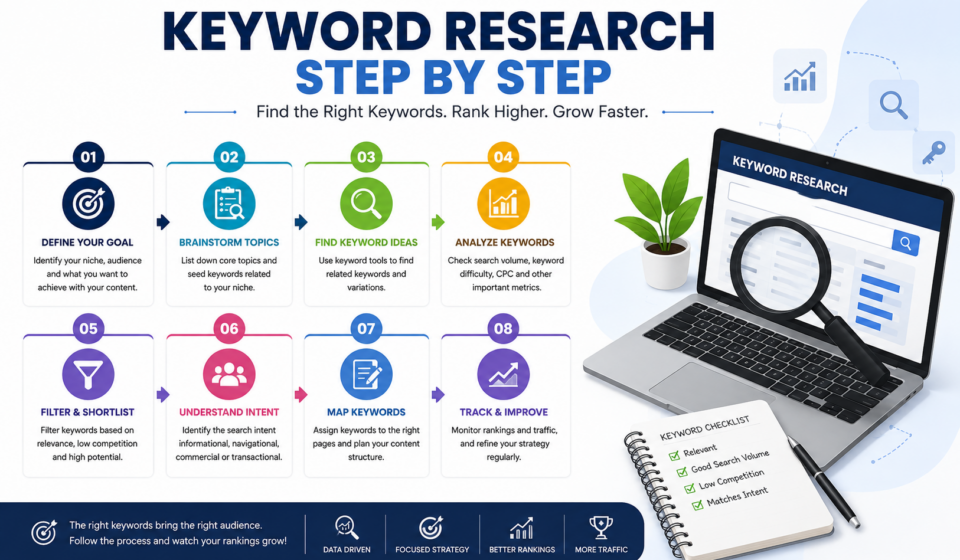
- Understanding Search Intent
- Step 1: Define Your Website Goals
- Step 2: Brainstorm Seed Keywords
- Step 3: Analyze Your Competitors
- Step 4: Use Keyword Research Tools
- Step 5: Understand Keyword Metrics
- Step 6: Find Long-Tail Keywords
- Step 7: Group Keywords by Topic
- Step 8: Choose Primary and Secondary Keywords
- Step 9: Create Content Around Keywords
- Step 10: Monitor Keyword Performance
- Common Keyword Research Mistakes
- Best Keyword Research Tools
- Frequently Asked Questions
- Final Thoughts
What Is Keyword Research?
Keyword research is the process of finding the words and phrases people type into search engines like Google when looking for information, products, or services.
For example:
Instead of writing an article about “website design,” you might discover people search for:
- website design tips
- responsive website design
- website design for beginners
- best website design software
- website design checklist
These search phrases become your target keywords.
Why Keyword Research Is Important
Keyword research helps you:
- Increase organic traffic
- Understand your audience
- Create valuable content
- Improve Google rankings
- Generate leads and sales
- Discover content ideas
- Beat competitors
Without keyword research, you’re simply guessing what people want.
Understanding Search Intent
Before choosing any keyword, understand why users search for it.
There are four types of search intent.
1. Informational
Users want information.
Examples:
- What is SEO?
- How to design a website
- Keyword research guide
These keywords are perfect for blog posts.
2. Navigational
Users are looking for a specific website.
Examples:
- WordPress login
- ChatGPT
3. Commercial
Users are comparing products.
Examples:
- Best laptops under $1000
- Elementor vs Divi
- Ahrefs review
4. Transactional
Users are ready to buy.
Examples:
- Buy hosting
- SEO course price
- Hire web designer
Knowing search intent helps create content that matches user expectations.
Step 1: Define Your Website Goals
Before researching keywords, ask yourself:
- What is my website about?
- Who is my audience?
- What products or services do I offer?
- What problems do I solve?
For example, if your website teaches web design, your audience may search for:
- HTML tutorial
- CSS course
- WordPress guide
- Elementor tutorial
- Responsive design
Your goals determine which keywords matter most.
Step 2: Brainstorm Seed Keywords
Seed keywords are broad topics related to your niche.
Examples for a digital marketing website:
- SEO
- WordPress
- Web Design
- Blogging
- Affiliate Marketing
- Google Ads
- Social Media
- Email Marketing
Write down 20–50 seed keywords before using research tools.
Step 3: Analyze Your Competitors
Competitor research reveals what already works.
Ask:
- Which keywords bring them traffic?
- Which articles rank well?
- What topics are missing?
- How detailed is their content?
Study:
- Page titles
- Headings
- URLs
- Meta descriptions
- Internal links
Learning from competitors saves time and uncovers opportunities.
Step 4: Use Keyword Research Tools
Keyword research tools provide search volume, competition, trends, and related keyword ideas.
Popular free tools include:
- Google Keyword Planner
- Google Search Console
- Google Trends
- Google Autocomplete
- Google People Also Ask
Popular paid tools include:
- Ahrefs
- SEMrush
- Moz
- Ubersuggest
- KeywordTool.io
Don’t rely on a single tool. Compare data from multiple sources for better decisions.
Step 5: Understand Keyword Metrics
Several metrics help evaluate keyword opportunities.
Search Volume
Shows how many times a keyword is searched each month.
High volume doesn’t always mean better.
Sometimes lower-volume keywords convert better.
Keyword Difficulty (KD)
Measures how difficult it is to rank.
For new websites, prioritize low-difficulty keywords.
Cost Per Click (CPC)
Indicates advertiser demand.
High CPC often signals commercial value.
Search Intent
Always ensure your content aligns with the user’s purpose.
Step 6: Find Long-Tail Keywords
Long-tail keywords are longer, more specific phrases.
Example:
Short keyword:
SEO
Long-tail keywords:
- SEO for beginners
- Local SEO checklist
- Technical SEO guide
- SEO tips for WordPress
Benefits include:
- Lower competition
- Higher conversion rates
- Easier rankings
- More targeted traffic
Long-tail keywords are ideal for newer websites.
Step 7: Group Keywords by Topic
Avoid creating multiple articles targeting nearly identical keywords.
Instead, organize related keywords into topic clusters.
Example:
Main Topic:
Keyword Research
Related Keywords:
- keyword research guide
- keyword research tools
- keyword research checklist
- keyword research tutorial
- keyword research for beginners
Publish one comprehensive article covering all related terms.
This approach strengthens topical authority.
Step 8: Choose Primary and Secondary Keywords
Each article should focus on one primary keyword.
Example:
Primary Keyword:
Keyword Research Step by Step
Secondary Keywords:
- keyword research guide
- SEO keyword research
- beginner keyword research
- long-tail keywords
- keyword research tools
Naturally include secondary keywords throughout the content.
Avoid keyword stuffing.
Step 9: Create High-Quality Content
Keyword research only works when paired with excellent content.
Google rewards content that is:
- Helpful
- Accurate
- Original
- Well-organized
- Easy to read
Include:
- Images
- Screenshots
- Tables
- Lists
- Examples
- FAQs
- Internal links
- External references
Focus on solving the reader’s problem rather than repeating keywords.
Step 10: Monitor Keyword Performance
SEO is an ongoing process.
Use tools like Google Search Console to monitor:
- Rankings
- Clicks
- Impressions
- CTR
- Average position
Update articles regularly by adding new information, improving headings, and expanding sections to maintain rankings.
Keyword Research Tips
- Target one primary keyword per page.
- Include keywords naturally in titles and headings.
- Write for people first, search engines second.
- Refresh older content periodically.
- Focus on quality over quantity.
- Build topical authority with related articles.
- Optimize images with descriptive file names and alt text.
- Use internal links to connect relevant content.
Common Keyword Research Mistakes
Avoid these common errors:
Choosing only high-volume keywords
High-volume terms are often highly competitive.
Ignoring search intent
Ranking is difficult if your content doesn’t match what users want.
Keyword stuffing
Overusing keywords hurts readability and SEO.
Not updating content
Search trends change over time. Refresh content regularly.
Skipping competitor analysis
Competitor insights can reveal valuable keyword opportunities.
Best Keyword Research Tools
Google Keyword Planner
Ideal for discovering keyword ideas and estimated search volumes.
Best For
Beginners and Google Ads users.
Google Trends
Shows seasonal trends and search interest over time.
Best For
Identifying trending topics.
Ahrefs
Offers comprehensive keyword data, competitor analysis, and backlink insights.
Best For
Professional SEO campaigns.
SEMrush
Provides keyword tracking, competitor research, and content optimization features.
Best For
Marketing agencies and advanced users.
Ubersuggest
A beginner-friendly platform with keyword ideas, search volume, and SEO metrics.
Best For
Small businesses and bloggers.
SEO Checklist Before Publishing
✔ Primary keyword in title
✔ Keyword in URL
✔ Meta description optimized
✔ H1 heading present
✔ H2 and H3 headings used
✔ Internal links added
✔ External links added
✔ Images optimized with alt text
✔ Mobile-friendly layout
✔ Fast page speed
✔ Schema markup (if applicable)
✔ Proofread content
Frequently Asked Questions
How long should keyword research take?
For a single article, 20–60 minutes is usually enough. Larger content strategies may require several hours.
Can I rank without keyword research?
It’s possible, but much less likely. Keyword research significantly increases your chances of attracting relevant traffic.
Are free keyword tools enough?
Yes, especially for beginners. Combining Google Keyword Planner, Google Trends, Google Search Console, and Google Autocomplete provides valuable insights. As your website grows, paid tools can offer deeper analysis.
How many keywords should one article target?
Aim for one primary keyword supported by several closely related secondary keywords. Cover the topic comprehensively instead of forcing many unrelated terms into one page.
How often should I update keyword research?
Review your keyword strategy every few months or whenever search trends, user behavior, or your business goals change. Regular updates help maintain rankings and uncover new opportunities.
Final Thoughts
Keyword research is the cornerstone of effective SEO. By understanding your audience, identifying search intent, analyzing competitors, selecting relevant keywords, and creating high-quality content, you build a strong foundation for sustainable organic growth.
Remember that keyword research is not a one-time task. Search trends evolve, competitors publish new content, and user needs change over time. Continuously refine your keyword strategy, monitor performance, and update your content to stay competitive.
Mastering keyword research today will help you create content that not only ranks higher in search engines but also delivers real value to your readers and supports your long-term digital marketing goals.
